
99 Exchange Login — Official Twin Runways, Browser Beside APK, One Balance
99 Exchange login runs on two runways: the phone or dektop browser, and the Android APK. Both ask for the same 99Exch user name and the same password, and both open one balance. Pick the lane that fits the device in your hand. Locked out, or no ID yet? The WhatsApp desk on +91 81097 11726 handles that part.
99 Exchange Login Bay — Trusted Browser and App Sign-In
Whichever runway you choose, the trip ends at this pair of boxes; the live version opens on 99exchlogin.com.in in a new tab.
Players also search
- 99 exchange login
- 99 exchange login password
- 99 exchange id login
- 99exch login
- 99 exch login
- 99 exchange login app
- 99 exchange login browser
- 99 exchange id password
- 99exch apk login
- 99 exchange login kaise kare
- 99 exchange id kaise milega
Searches That Reach the 99 Exchange Login — Clear, Fast Matches
Three phrasings bring most people to this page, and each one ends at the same 99Exch sign-in form. Full form or short form, the account behind it does not change.
When a Quick 99 Exchange Login Search Comes From a Phone Without the App
A plain 99 exchange login search from a mobile browser nearly always means the person wants the user name and password boxes right now. The browser runway gives them exactly that with nothing to install, which is why the first button on this page opens it.
On Android the same search can also end with the 99Exch APK on the home screen, so the next sign-in skips typing an address.
- 99 exchange login: the form itself, reached by browser or by app
- 99 exchange login password: what goes under the user name, on browser and APK alike
- 99 exchange id login: the same form again, where id simply means your user name
Why the Secure 99 Exchange Login Password and the ID Spelling Share One Form
Further down, the 99 exchange login password gets a section of its own on this page: why the APK and the browser read one 99Exch password, why a mirror address takes it unchanged, and which three moments make the screen ask for it.
Every 99 exchange id login button on this site points to one address, 99exchlogin.com.in, opening in a new tab. The APK link sits inside the sign-in card above. Nothing else to find.
99 Exchange Login Runways Side by Side — Official Browser and Android APK
Runway mapShort version: the browser runway suits every device, while the APK runway suits Android owners who sign in to 99Exch most days. One ID either way.
Browser Runway for the 99 Exchange Login — Free, Nothing to Install
Open the login address in Chrome, Safari or a laptop browser and the 99Exch sign-in screen appears: a user name box, a password box, the log-in button and a demo option beside it. That is the whole runway.
- Works on Android, iPhone, laptop, desktop
- Install none at all
- Weak spot an Indian ISP can block the address; a working mirror carries the same ID and balance
- Fits best an iPhone, a borrowed handset, a quick balance check at work
APK Runway for the 99 Exchange Login — Quick Android Access
The 99Exch app is an Android file you install yourself, because it is not listed on the Play Store. After that, tapping its icon drops you on the very same sign-in screen, minus the address bar.
- Works on Android phones only
- Install one APK file, from outside the Play Store
- iPhone no app; the browser is the route
- Fits best daily sign-ins on your own phone
What stays identical across both runways matters more than what differs. Your 99Exch user name, your password, the balance, the cricket book with IPL match markets in season, football and tennis and kabaddi, the live casino tables, aviator and the other crash games: all of it is one account, and the screen you log in from is only the door you happened to walk through that day.
Faster on the app? We have no measured figure, so we will not claim one. What the app does remove is the step of finding and typing an address, and that is probably where most people feel the difference.
The install itself (unknown sources, updates, the iPhone home-screen shortcut) is covered on the 99Exch APK install page, so this page stays on the comparison. One last point. Switching runways never needs a new ID.
After the 99 Exchange Login: What Each Runway Shows — Same Live Lobby
Once the pair is accepted, the browser and the 99Exch app open onto one lobby. The sport strip, the in-play boards, the casino cards: same layout, same account, same numbers. Prices on the exchange boards open only after login on both, so a logged-out visitor on either runway sees the frame without the figures.
Where they part ways is everyday handling. A browser tab can be closed, forgotten, or reopened from history on a shared computer, and if you signed in on someone else's laptop the account stays open in that tab until you log out, so the log-out step on a borrowed device is the one habit this whole comparison really asks for. The app lives on your own phone. Different risk, different habit.
Pick a 99Exch runway in ten seconds
- Own Android phone, signing in most days: the APK.
- iPhone of any age: the browser, since no app exists for it.
- Office or shared computer: the browser, then log out before you leave.
- Brand-new ID, never signed in: the browser first, to prove the pair works.
One case we cannot settle for you. Whether the app keeps loading on a network where the browser address is blocked is not something we have tested, so treat any claim like that, ours included, with caution.
Both runways also carry the demo option for a practice balance (what it pays and what it does not is covered on the 99Exch home page with the demo ID), so testing the layout before a real sign-in works the same in the browser and in the app.
Using both? Fine. Plenty of 99Exch players keep the APK for the evening and the browser for a quick look from a work laptop.
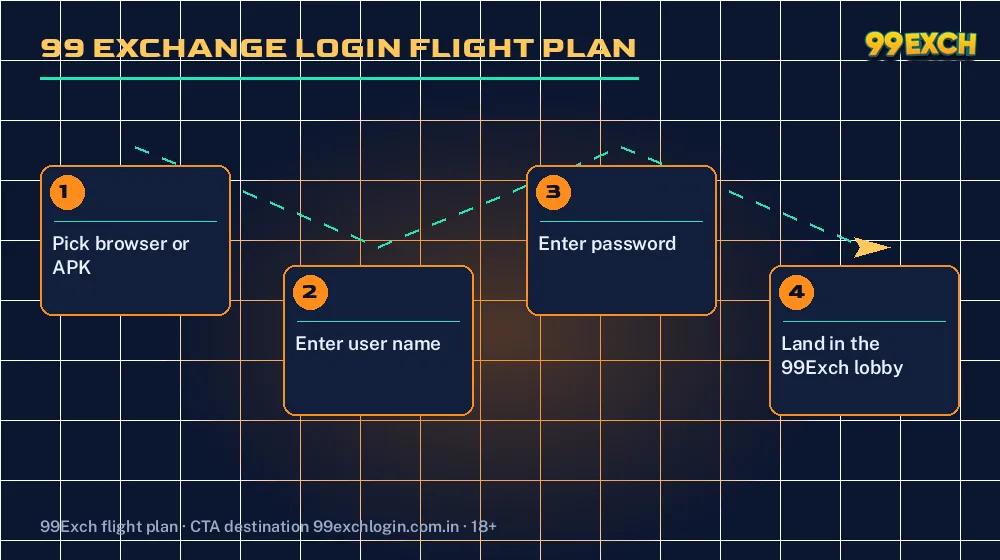
99 Exchange Login Steps — Fast Sign-In Both Runways Share
ChecklistStrip away the device and the 99Exch sign-in is the same short sequence. Six moves.
- Choose your runway: the browser address 99exchlogin.com.in, or the 99Exch APK icon on an Android phone.
- Wait for the sign-in screen with its user name box, password box, log-in button and demo option.
- Into the first box goes the user name the 99Exch desk sent; on the app it is the identical string you would use in the browser.
- The second box takes the password from that message, unchanged between runways.
- Tap log in; the lobby opens with the same balance whichever runway you used.
- Step failed? Quote its number to the 99Exch WhatsApp desk on +91 81097 11726.
Worked example: moving from browser to app
Say you got your ID last week and have only ever used the browser on your Android phone. You install the APK, open it, and type the same two lines from the chat. The lobby that loads shows the balance you left on the browser, nothing reset, nothing duplicated.
The reverse case is just as plain. A friend's iPhone has no 99Exch app, so you open the browser runway there, type the same pair, and you are on the same account; log out when you hand the phone back.
A third case: the very first sign-in, minutes after the desk sends the ID. Open the browser runway first even if you plan to install the app later, because it confirms the pair works before any download enters the picture; if it fails there, you know straihgt away it is a detail to fix in the chat, not an install problem.
What the 99Exch desk needs when a step fails
Four things, in one message: your user name, the runway you used, the step number from the checklit above, and a screenshot of whatever the screen said. Never the password itself. With those, the desk can usually tell a typing slip from a lockout without a round of follow-up questions, and you get back to the lobby sooner.
For the short-form version of this walk, with each box and what the screen shows after it, the 99Exch login field-by-field walk goes slower than this checklist does, which suits a very first sign-in better than a quick reminder.
99 Exchange Login Password — Secure Rules That Hold on Both Runways
PasswordPeople search for a 99 exchange login password rule expecting a length or a symbol requirement. No such rule is published anywhere we can point to, so this page will not invent one. What can be said is narrower and more useful.
- Day one. Whatever password came with the new ID is the one both runways expect.
- Second runway. Adding the app after weeks on the browser, or the other way round, means typing the identical 99Exch password once more.
- Forgotten or refused. This is a reset, and resets go through the desk on +91 81097 11726.
The password is part of the 99Exch ID, not part of the device. Anyone holding your user name and that password can open the balance from either runway, on any phone, from any working address, and nothing about the browser or the app adds a second lock in front of it, which is exactly why the pair should live in your chat and nowhere public.
Mirrors follow the same logic. A blocked address does not mean a blocked password: because the pair is tied to the account and not to the domain, the same two lines work on any address that loads the 99Exch sign-in screen. No new password per mirror. Nothing to re-register.
The browser runway has one quirk the app lacks. Chrome or Safari may pop up an offer to remember the 99Exch password; accept it on your own handset if you like, but say no on an office machine, or whoever opens that address next meets your details pre-filled.
Got a fresh password from the desk after a lockout? Use it on both runways from that moment, because the old one is gone for both, not just for the screen where you had the trouble. That point catches people out: the app remembers nothing that the browser does not.
The forgot-password route itself, what to send and what comes back, sits on the play 99 exchange login password page. We keep it there so the 99Exch desk instructions live in one place.
99 Exchange ID Login Spelling — Clear Answer for Every Search Variant
SpellingEvery one of these searches ends at one 99Exch form. None of them is a separate service.
typed 99 exchange id login → same sign-in, id means user name
typed 99 exchange login → full-form brand name, same form
typed 99exch login → short-form name, same form
typed 99 exch login → spaced short form, same form
Why does the word id creep into the search at all? Because the desk, the chat and most players call the account a 99Exch ID, so 99 exchange id login is simply how many people describe signing in with it, even though the screen never shows a box labelled ID.
The first box asks for a user name. That user name is the ID. Your password is its partner.
One trap is worth a sentence. Typing any of these phrases into the address bar runs a web search rather than opening the 99Exch login, and the results list mixes in several lookalike names; the address to open is 99exchlogin.com.in, which is also where every button on this page points. If that address ever fails to load where you are, the 99 Exchange com mirror status from the last test lists which mirror addresses answered on the last test.
Once the right address has opened, bookmark it in the browser or put the 99Exch APK on your home screen. Either one ends the need to search for 99 exchange login every time, along with the lookalike results that come with it.
Full form or short form makes no difference to the account either (search engines treat them as different queries, the login form does not).
A related search, 99 exchange id password, is really the second half of the same question. The ID is the user name, the password is the other line in the chat, and together they are everything the 99Exch sign-in screen ever asks for. There is no PIN, no separate app code on top, nothing else to remember for either runway.
99 Exchange Login Not Working — Quick Fixes on Each Runway
FixesHaving two runways gives you a free diagnostic. Use it before anything else.
The cross-check
Try the same 99Exch user name and password on the other runway. If both reject the pair, the details are the problem and the WhatsApp desk needs to look at them. If only one runway fails, the account is fine and the fault sits with that address or that copy of the app.
- Browser: the page will not load at all. An Indian ISP may have blocked that address. A working mirror opens the same 99Exch sign-in with the same ID and the same balance; check the address list before trying random links from a search.
- Browser: the form loads but refuses the pair. Retype both lines by hand, then run the cross-check on the app if you have it.
- App: the icon opens but sign-in fails. Run the cross-check on the browser. Browser works? Then reinstall or update the APK from the 99Exch APK download page.
- App: will not install on an iPhone. Expected. There is no iPhone app, so the browser runway is the route.
- Both runways reject the pair.
- Browser: the address opened an information page, not a sign-in screen. Wrong door. In the 12 Oct 2026 test, 99exch.in redirected to a third-party information site rather than the 99Exch login portal, so open 99exchlogin.com.in or a listed mirror instead.
- Demo works, real sign-in does not. The demo option runs on a practice balance, so if it opens, the screen and your connection are fine and the fault points back at the pair.
- Either runway: signed out without warning. Log in again with the same pair. Once is nothing. If it keeps happening on one device, tell the desk which runway and roughly when, since a pattern is easier to trace than a single drop. Message +91 81097 11726 with your user name and a line saying which runways you tried.
That last line saves time. A desk message that says I tried the 99Exch browser and the app, both refuse my password tells the person reading it the problem is the credentials, not the network or the phone, and that is roughly the difference between one reply and three.
Hard to say more without knowing the error on your screen. Send a screenshot with the message if you can.
99 Exchange Login Questions — Clear, Trusted Answers
How do I do the 99 Exchange login?
Open the browser address or the Android APK, type your 99Exch user name and password, and tap log in. Both routes land on the same lobby and the same balance. No ID yet? The WhatsApp desk on +91 81097 11726 sets one up and sends the details in the chat.
What rules does the 99 Exchange login password follow?
The password belongs to your 99Exch ID and works unchanged on the browser and the app. It arrives in the WhatsApp chat with your user name. No length or symbol rule is published, so type it exactly as sent and ask the desk for a reset if it stops working.
What does 99 exchange id login mean?
It is the same sign-in under another name. Searchers add the word id because the account is called a 99Exch ID, but the screen asks only for a user name and a password. Typing 99 exchange id login, 99exch login or 99 exchange login all lead to one form.
Browser or app: which suits the 99 Exchange login better?
Use the browser on an iPhone, a laptop or a borrowed phone, and the Android APK if you sign in daily on your own handset. Both read the same 99Exch user name and password and show the same balance, so switching later costs you nothing at all.
Why is my 99 Exchange login not working?
Run the two-runway test to find out. Open the 99Exch sign-in in the browser and in the APK with the same pair: a refusal on both means the user name or password needs the WhatsApp desk, while a refusal on just one points at that address being blocked or that app copy being out of date.
Can two devices stay logged in to one 99Exch ID?
No published rule covers that, so we cannot promise it either way. The same ID does open on the browser and on the Android app. If one device signs you out after the other logs in, log in again with the same pair and tell the WhatsApp desk if it keeps happening.
Is the 99 Exchange login free to use?
Nothing on the login screen asks for payment, and the demo option needs no deposit. Real-money play is different: it runs on the balance in your 99Exch wallet, which is funded through Indian rails such as UPI or bank transfer. Opening the form and signing in carry no charge.