
99Exch APK — Official Android Cockpit, One Boarding Pass Across Web and Phone
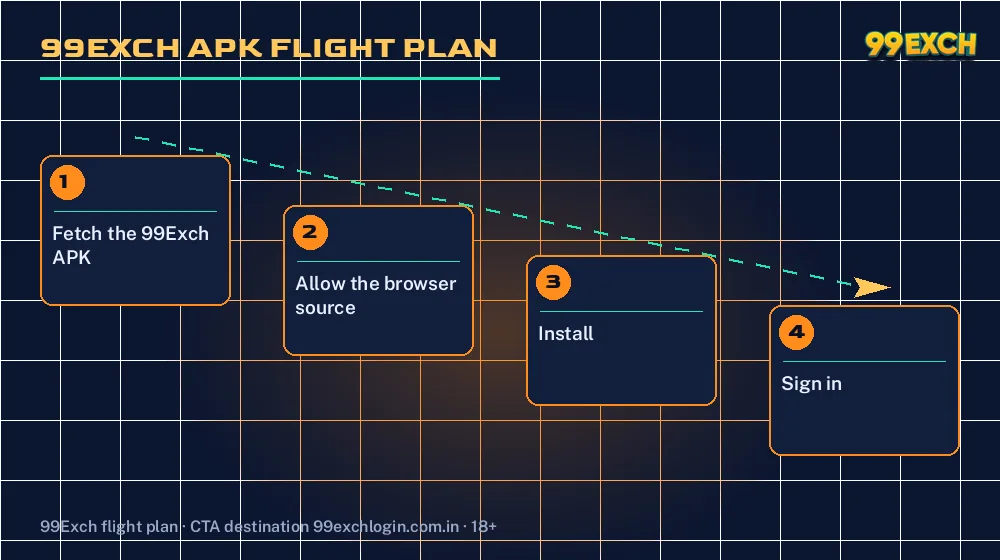
The 99Exch APK is the Android file you sideload from the login portal, because the 99Exch app has no Play Store listing. Three legs get it running: fetch the file in Chrome, switch on installs from that browser, then install and sign in with the ID you already use on the web. iPhone owners pin the browser page to the home screen instead.

99Exch APK Boarding — Secure Login Inside the Android App
This mock card previews the two boxes waiting after leg three of the 99Exch APK install; the real ones only fill in inside the app or on the portal. Same ID, two screens.
Players also search
- 99exch apk
- 99exch app download apk
- 99exch com apk
- 99 exchange apk
- 99exch app download apk latest version
- 99exch download
- 99 exchange app
- 99exch apk kaise download kare
- 99exch app iphone
99Exch APK Searches Sorted Into One Clear Download Route
On these runway pages the Android file has a single owner, this page, and the APK shortcut in the bottom dock opens it from anywhere on the site. Spellings vary: 99exch apk, 99 exchange apk, 99exch download apk. Same file, every spelling. The 99exch app and the 99 exchange app name one product, handed out from 99exchlogin.com.in rather than through any store.
What a 99exch app download apk search gets on this page
Searches for 99exch app download and plain 99exch download end at the same three legs, laid out in full further down:
- fetch the file from the portal button while Chrome is open
- allow installs from that one browser when Android asks
- install, open, and type the username you use on the web
Where the 99exch com apk and latest-version searches fit
The 99exch com apk phrasing comes from the old .com address, which did not load when we tried it on 12 Oct 2026, so the portal button is the route that worked that day. A 99exch app download apk latest version search is really an update question, and the update is the install done again:
- open the portal from this page once more
- download the current file
- tap Install over the copy already on the phone
Your ID is the same one the browser uses, so an update or a fresh reinstall leaves the account itself untouched.
99Exch App Download APK in Three Quick Legs
Install legsThree legs, one phone. Everything here happens on the Android handset itself, with Chrome open and the 99Exch portal loaded in a tab; no computer, no cable, no second device.
- Fetch the file from the portal. Tap the APK button on this page. It opens the 99Exch login portal at 99exchlogin.com.in in a new tab, where you pick the Android download and let Chrome save it. If Chrome asks whether you want to keep a file of this type, choose to download it anyway, since this is the file you went looking for.
- Approve Chrome as a source. Tap the saved file in the Chrome download list. Android halts with a notice that this source is not allowed yet; follow its Settings link, flip the Allow from this source toggle beside Chrome, and come back with the back gesture so the Install button goes live.
- Install, then board with your existing ID. Press Install and let Android finish, then press Open. The pair the 99Exch app asks for is the one you would type at 99exchlogin.com.in in a browser; no app-only account exists, and a wrong pair fails here for the same reason it would fail on the web.
What appears after leg three is worth knowing in advance. The first thing the 99Exch app wants is your login, not a sign-up form, so have your username ready before you tap Open. After a successful login you reach the same account, sport desks and casno rooms that the web version shows.
That is the whole sideload. Most of the frictoin people hit sits in leg two, because Android words its permission prompt differently from phone to phone, and leg two gets its own section below for that reason.
A lost password does not mean a lost install. The 99Exch app stays exactly as it is while the WhatsApp desk on +91 81097 11726 sorts out a reset, and the new pair goes into the same two boxes on the app's sign-in screen, the same way a web player would use it at the portal. (Keep that chat thread; it doubles as your record of the ID.) Curious but not committed? The portal also has a 99Exch Demo ID with a practice balance: no deposit, and no real payout either.
Fast 99Exch Download Prep Before You Tap the File
Pre-flightFive things decide whether the 99Exch download goes through on the first try. None of them is complicated, but skipping one is the usual reason someone ends up reinstalling twice.
For a brand-new player the sensible order is account first, file second. Sort the ID on WhatsApp, save the pair somewhere you can copy from, and only then start the 99Exch download, so that leg three ends inside the lobby rather than at a sign-in screen you cannot pass. Account first, always. The page on how the 99Exch com WhatsApp number issues a fresh ID covers that half. If you are completely new and want the bigger picture of what the account opens before you download anything, the welcome to 99Exch overview covers that, and the 99Exch APK will still be here when you come back.
One small habit helps: download while you are on the phone you actually plan to use. Sending the file from a laptop by cable or chat app works in theory, but it adds a step where the file can get renamed, compressed or cut short, and the 99Exch install then fails for reasons that have nothing to do with the app.
Secure Unknown-Sources Switch for the 99Exch APK
Leg twoAndroid refuses any app that does not come from its own store until you say otherwise. That refusal is normal. It is the reason the 99Exch APK needs one permission that a Play Store app would never ask for.
Newer Android builds grant the permission per app. When you open the 99Exch APK, the prompt names the app you opened it from, usually Chrome or the Files app, and carries a Settings shortcut. Inside, a single toggle reads something close to Allow from this source. Switch it on, go back, and the install button becomes active.
If the prompt never appears, go the long way: Settings, then Apps, then Special app access, then Install unknown apps, then pick the browser you donloaded with.
Older phones keep one global switch instead, normally called Unknown sources and filed under Security or Lock screen and security. Turning it on lets every app install files, not just the browser, so it makes sense to switch it off again once the 99Exch app is in place.
Samsung, Xiaomi, Vivo, Oppo and Realme all shuffle these menu names a little. The search bar at the top of Settings finds the toggle faster than any menu path.
Here is the trap that catches most people. The permission belongs to the app that opened the file, not to the file itself, so if you allowed Chrome but then tapped the 99Exch APK from the Files app, Android asks all over again and it looks as if the first approval did nothing. Just approve the second one too. Or open the file from the Chrome downloads list, where the first approval already applies. Leg two also returns at every 99Exch update, since each new file asks for the same approval.
99Exch App Download APK Latest Version — Safe Update Route
RefuelStore apps update themselves overnight. A sideloaded 99Exch app does not have that luxury, because the Play Store has no listing to check it against, so every update is you repeating the download and installing the new file over the old one. Same three legs.
We cannot tell you how often a new 99Exch build appears, and we will not pretend to know a version number, because neither is something the portal publishes for us to check. The practical habit is simpler: if the app starts behaving oddly, or a screen in the browser looks different from the same screen in the app, fetch the file again and install over the top. Probably fixed.
Sometimes Android answers an install-over with App not installed. That usually means the copy on the phone and the new file disagree about something under the hood, and the clean fix is to uninstall the old 99Exch app first, then install the new file fresh, then sign in again with the same ID you have always used, since the account lives with 99Exch and not on the handset. Uninstalling removes only the app from your phone. Your ID stays exactly where it was.
Quick 99Exch App Fixes When Android Refuses the File
Tower callsProblems with a 99Exch APK nearly always belong to one leg of the install, so the call-outs below follow the legs in order. Find your leg. The fixes for it sit in one place.
Most of these errors trace back to leg one or leg two rather than to the 99Exch app itself, which is mildly reassuring, because a broken download or a missing permission is something you can fix in under a coffee break without contacting anyone at all. When none of the above matches what your screen says, take a screenshot and send it to the 99Exch WhatsApp desk; a picture of the exact message beats a description of it every time.
A typical stall, pieced together from the usual pattern: someone approves Chrome, then opens the 99Exch APK from a file manager, hits the block, decides the file is broken and downloads it again, three or four times. Now there are several copies and the same block on each. One approval for the file manager would have ended it on the first try.
99 Exchange App on iPhone — Easy Home-Screen Route
iOS gateSafari does the job. An iPhone cannot run an Android package and there is no iOS build of the 99Exch app to install, so the dependable setup is a pinned Safari shortcut to the very portal the Android button opens.
- Open Safari and tap the portal button on this page.
- Once the 99Exch login screen loads, tap the Share icon.
- Scroll the share sheet and choose Add to Home Screen.
- Keep or edit the name, then tap Add.
The new icon sits among your apps and opens the 99Exch login in one tap, which gets you most of what an installed app would, and the username and password are the same ones an Android user types into the 99 Exchange app, so a player who switches phones never needs a second ID. That part matters most. Your account follows you, not the device.
Should the pinned page stop loading one day, the likely cause is an address block rather than anything wrong with your iPhone; open a working mirror in Safari and pin that instead. Our page on which 99 Exchange com addresses answered the last test lists the domains that loaded, and the same 99Exch ID works on every one of them.
99Exch Com APK vs Browser Login — One Trusted ID on Both
Same passPeople who search 99exch com apk are often really asking whether the app is a different thing from the website. It is not. The 99Exch app and the browser login open the same account, the same wallet and the same markets; the APK is a convenience wrapper, roughly speaking, and the browser is the fallback that never needs installing.
In the Android app: an icon on the home screen, no address to type, and the 99Exch lobby a tap away. The cost is the sideload itself, plus repeating it whenever you want a newer build.
In the browser: nothing to install and it works on any phone, iPhone included. The cost is typing or bookmarking an address, and switching to a mirror if your ISP blocks the one you use.
Behind either door sits the same 99Exch lobby: the cricket book with IPL match markets in season, football, tennis, kabaddi and horse racing, live casino tables, card games such as teen patti, andar bahar, roulette, blackjack and dragon tiger, plus crash and instant games like aviator, mines and colour prediction. Match markets work exchange-style, so you can back a side or lay it on matched odds, with a fixed-odds sportsbook alongside.
Changing phones shows the split clearly. On a new Android handset you repeat the three legs and sign in; on a new iPhone you pin the portal in Safari and sign in. Either way the 99Exch ID, its password and its balance come with you untouched, because none of them ever lived on the old device.
About the .com in that search phrase: 99exch.com did not load when we checked it on 12 Oct 2026, so nothing on this page depends on it. Every APK button here points to the 99Exch login portal instead. And whichever route you choose, the real web login form sits behind a reCAPTCHA check, and the account is for adults only, 18 and over.
99Exch APK Questions — Real Answers Before You Install
How do I download the 99Exch APK on an Android phone?
Download it on the phone itself from the 99Exch login portal at 99exchlogin.com.in, which the APK button here and the APK shortcut in the bottom dock both open. Save the file in Chrome, approve Chrome as an install source, press Install, and sign in with your existing ID. Three legs, one handset.
Is the 99Exch APK safe to install?
Install it only from the 99Exch login portal, which is where every APK button on this site leads. Android and Play Protect warn about any app that arrives outside the Play Store, so a warning alone is expected. Delete any copy that reached you through a forwarded link and fetch a fresh one from the portal.
Why is the 99Exch app not installing on my phone?
Usually the source permission is off, the download was cut short, or an older 99Exch app clashes with the new file. Allow installs for the app you opened the file with, re-download on a steady connection, and uninstall any old copy first. Low storage causes the same failure, so clear some space too.
Is the 99Exch app available on the Google Play Store?
No, Google Play has no part in it: Android players get the 99Exch app as a file from 99exchlogin.com.in. With no store in the middle, two jobs fall to you, granting Chrome install permission during leg two and fetching a newer APK whenever you want an update, because nothing refreshes the app on its own.
How do I update the 99Exch APK to the latest version?
Download the current 99Exch APK from the login portal again and install it over the app already on your phone. If Android says App not installed, uninstall the old copy first and install the new file fresh. Your ID is unaffected, so sign in again with the same username and password.
Can I use the 99Exch app on an iPhone?
Not as an APK, because iPhones cannot open Android files. Open the 99Exch login portal in Safari, tap Share and choose Add to Home Screen. The icon then launches the login page like an app, and the same 99Exch ID that Android players use works there without any change.
What is the difference between the 99Exch com APK and the website?
There is no account difference: the 99Exch app and the browser open the same ID, wallet and markets. The app saves typing an address, while the browser needs no install and works on iPhone. The 99exch.com address itself did not load on 12 Oct 2026, so use the portal button.