
Play 99 Exchange Login — Fast Password Entry and the Official Reset Route
Play 99 Exchange login usually breaks for one of four reasons, roughly in this order: capitals typed wrong, a browser offering an outdated saved password, an address your network has blocked, or a password nobody remembers. You can clear the first three yourself on the 99Exch sign-in. The fourth goes to the trusted WhatsApp desk for a secure reset.
Play 99 Exchange Login Fix Bay — Secure Password Reset Route
Two slots, same order as the live 99Exch form: issued username on top, case-exact password underneath. The real thing opens from the button.
Players also search
- play 99 exchange login
- play 99 exchange login password
- play99 exchange login
- play 99 exch login
- play 99 exchange forgot password
- 99exch password reset
- 99 exchange login password change
- play 99 exchange password bhool gaya
Where Play 99 Exchange Login Words Land on This Trusted 99Exch Page
Secure password slot on the Play 99 Exchange login screen
This box maps two searches onto one fix bay: play 99 exchange login, and its narrower twin about the password slot. Long name, same brand. Whichever of the two brought you here, the credentials the 99Exch desk handed out open the browser form, the Android app and whichever 99Exch mirror is answering on your network today, so nothing about the account depends on which spelling you searched.
The second box causes most of the grief. A play 99 exchange login password is case-sensitive, so one capital typed small, or a browser quietly filling in last month's password, earns the same refusal as a completely wrong entry.
Trusted reset request for a lost Play 99 Exchange login password
Resets on 99Exch run through the WhatsApp desk at +91 81097 11726, and the fresh details come back inside that same chat rather than anywhere else.
- play 99 exchange login
- The 99Exch sign-in screen itself: username slot, password slot, then the login button.
- play 99 exchange login password
- Whatever goes in the lower box of the 99Exch form; capitals count, and only the desk can issue a replacement.
- Demo button on the same screen
- Practice balance, no deposit needed, no real payout.
99Exch Play 99 Exchange Login Password Errors — Fast Symptom Board
Fault boardMost refused logins on 99Exch are not account problems. They are typing problems, saved-form problems or address problems, and each one leaves a slightly different clue on the screen, so it pays to read the symptom first and choose the fix that matches it instead of trying all six at once and losing track of what chnged.
Clue first, fix second.
- Refused, yet you are sure it is right
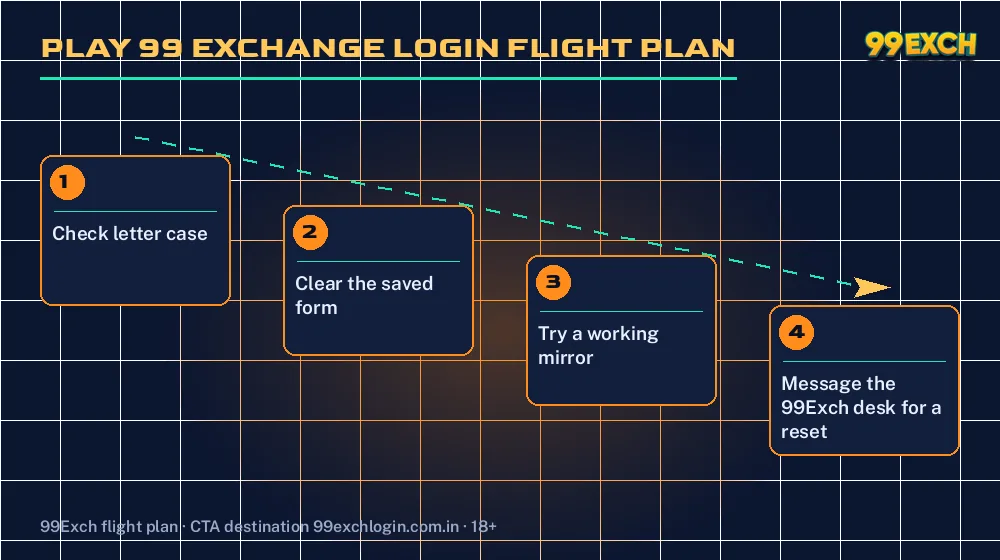
- Check letter case one character at a time. A mixed-case 99Exch password has to be typed in that exact mix, every single attempt.
- The password box fills itself
- Your browser is offering a saved entry. After a desk reset, that saved entry is the old password. Clear the box and type the new one.
- Works on the phone, fails on the laptop
- Two devices keep two saved forms. One of them still holds an outdated 99Exch password, so overwrite it there.
- The login screen will not open at all
- Not a password fault. The address is most likely blocked on your network; move to a working mirror (see the address check below).
- A page opens, but it is an information site
- Wrong address. On 12 Oct 2026, 99exch.in redirected to a third-party information site, not the 99Exch login portal. Do not type a password there.
- Forgotten outright
- Stop typing variations into the 99Exch form. The desk reset in the next section is the only route back.
A quieter version of the first fault catches plenty of people. When you copy a password out of the WhatsApp chat, the selection can pick up a trailing space or a line break, and the form treats that extra character as part of the password, so typing it by hand is usually faster than hunting for the stray gap.
Two checks are deliberately missing from this board. The caps-lock warning and the reCAPTCHA tick have their own write-up on the caps-lock and reCAPTCHA notes for 99Exch com login, which cover the form-level errors; this page stays with the Play 99 Exchange login password itself and the reset path. If the board above fixes nohing and the screen does load, the password really is wrong, and the reset is the next move.
Official 99Exch Reset Route for a Forgotten Play 99 Exchange Password
Reset callA forgotten Play 99 Exchange login password is reset by people, not by a link. The 99Exch WhatsApp support desk handles new IDs, password resets and deposit or withdrawal help in one chat, and the replacement login details arrive in that chat, which is also why the number you message should be the one printed here and nowhere else.
SEND your username exactly as it was issued
ASK a reset of the Play 99 Exchange login password
KEEP BACK your guesses at the old password
WATCH the same chat for the new details
That is the whole request. Short messages are easier for the desk to act on, and the username alone tells them which 99Exch account you mean.
- Run the fault board above first, because a reset changes nothing when the real culprit is a blocked address or stale autofill.
- Send the 99Exch desk the request laid out in the call-out above, word for word if that helps.
- Check the replacement in the thread for capitals, digits and anything that looks like a space.
- Remove the stale saved password for that 99Exch address from the browser or password manager.
- Type the replacement into the 99Exch password slot yourself, then let the browser keep the new version.
Step four gets skipped more than any other. Skip it and the browser drops the old password straight back into the slot on your next visit, the form refuses it, and it looks as if the reset failed when it actually worked fine (annoying, but harmless once you know).
Never had a username at all? Then a reset is the wrong request. Read how a first Play 99 Exchange ID is issued instead; it is a different conversation with the same 99Exch desk.
Play 99 Exchange Login on a Blocked Address — Quick 99Exch Mirror Check
Address testPicture the tab: you open your 99Exch bookmark, the spinner turns, and no username slot ever draws. That is a block, not a wrong password. Indian internet providers cut off betting domains without notice, which is why 99Exch keeps several mirror addresses, and why the same username, password and balance carry over to whichever one your connection can still reach. Nothing to reset.
Address test run on 12 Oct 2026: 99exch.red, 99exch.green, 99exch.win and 99exch.live each loaded the same 99Exch login screen. 99exch.com did not load that day. 99exch.in sent visitors to a third-party information site instead of the login portal.
Results like these move. Treat that list as a snapshot from one morning, not a promise for next week.
What stays the same across mirrors
The 99Exch username, the Play 99 Exchange login password and the account balance. A reset done while you were on one address also applies on the others, because it is one account.
What changes across mirrors
Saved passwords. Browsers file them per address, so a password saved on the .red address will not autofill on the .green one. Expect an empty slot and type it in.
That second column explains a lot of the autofill confusion. A player switches from a blocked 99Exch address to a working mirror, sees the password box sitting empty, assumes the account has been wiped, and messages the desk in a panic, when really the browser just has nothing saved for the new address. Probably the easiest problem on this page to solve.
Password accepted and lobby open? From there the Play 99 Exchange lobby overview takes over, while the 99Exch front page holds the index of every runway page here.
Play 99 Exchange Login Questions — Verified 99Exch Answers
Why is my Play 99 Exchange login password not working?
Usually it is letter case or an old saved password. The 99Exch form treats capitals and small letters as different characters, and browsers often refill a password from before a reset. Clear the box, type it by hand, and if the login screen itself will not load, switch to a working 99Exch mirror address.
How do I reset my Play 99 Exchange login password?
Quote your username to the 99Exch desk on WhatsApp, +91 81097 11726. The trap comes later: on your next visit the browser slips the pre-reset password back into the slot, the form refuses it, and the reset looks broken. Delete that saved entry, on both addresses if you use two 99Exch mirrors.
Is Play 99 Exchange login the same as 99Exch login?
Yes. Play 99 Exchange is how many searchers spell out 99Exch in full, and the result is one sign-in: the username and password from the 99Exch desk work identically whether you arrive through a mirror address, a bookmark or the Android app. Nothing separate needs registering.
Why does autofill fail on the Play 99 Exchange login screen?
Mostly because the browser remembers a password against one exact web address and one version of it. Hop from the .red 99Exch mirror to the .win one and the slot sits blank; get a desk reset and the stored copy is one version behind. A single hand-typed 99Exch login on each address refreshes it.
Can I use Play 99 Exchange login on an iPhone?
Yes, and the password rules do not change on iOS. Capitals still count, the browser still saves the password against one 99Exch address, and a desk reset still arrives on WhatsApp. Only the doorway differs: a working 99Exch address opened in the iPhone browser, since the app is an Android apk.