99exch Com Login — Four Fast Checks Before You Ask for a Secure Reset
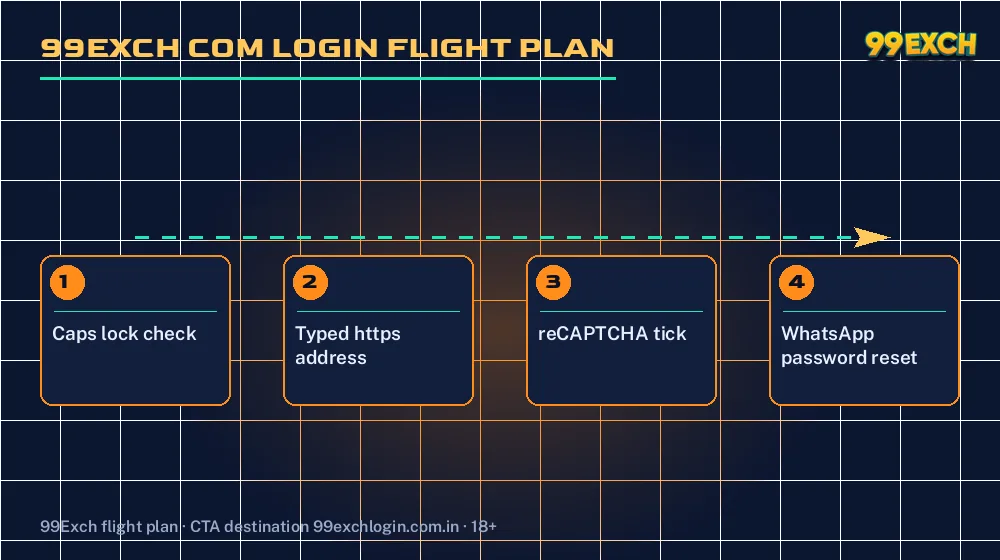
99exch com login goes through once four things line up: caps lock is off, the address carries https in full, the reCAPTCHA tick is fresh, and the password is current. If all four check out and 99Exch still turns you away, ask the official WhatsApp desk for a secure reset. One wrinkle first. The .com host did not load at all on 12 Oct 2026.
99Exch Com Login Preflight — Four Quick Checks in a Fixed Order
Preflight
Order matters. A refused sign-in on 99Exch is often something small on your own screen, and the four checks below are sorted from cheapest to most expensive: the first three take secons each, while the fourth means a WhatsApp conversation and a fresh set of details to type.
Run them top to bottom, even when you are sure about one of them.
Desktop and phone fail differently, by the way. On a laptop the usual culprit is a caps lock key left on from something else; on a phone it is the keyboard deciding your password is the start of a sentence. Same symptom, two causes.
Caps lock and keyboard case: type the password once where you can see it, a notes app will do, and compare it letter by letter, because a caps key left on or an auto-capitalised first letter hides behind the dots.
The typed address: write https:// at the front, then the address you were given in full, with no stray dot, space or missing slash, and confirm the bar still shows https once the page settles.
The reCAPTCHA tick: leave it for last, tick it right before you press login, and tick it again if the page sat idle or the box reports that the check expired.
The password itself: if the first three are clean and 99Exch still says no, stop guessing and ask the WhatsApp desk for a reset.
Brief 01 · Picture the cost of skipping ahead. Caps lock was on the whole time, you asked for a reset anyway, and the replacement 99Exch password now fails for the identical reason, so you are back in the chat explaining the same refusal while the key that caused it is still switched on.
That is the theory, anyway. In practice most people reach for the reset first, because it feels like action.
Why this sequence? Each check rules out one family of errors, so by the time you reach step four the only thing left standing is the password. Caps lock covers the case problem. The typed address covers the wrong host, the plain http version and the half-typed URL. The reCAPTCHA tick covers the form that silently refuses to submit.
Some players skip straight to step two because the 99Exch page is not opening at all, and that is fair, since no amount of retyping a password helps a form you cannot see. Different problem entirely. If that is you, jump to the status check further down, then come back here once the form appears.
One small habit helps on every pass: type the password into a notes app first, look at it, then copy it across. Clumsy, yes. It also shows you instantly whether the phone keyboard turned your first letter into a capital, which is the single most common surprise on a 99exch com login password typed with one thumb.
Typed 99Exch Com Login Addresses — Secure https, Plain http and the m Route
Address bar
Three phrasings turn up again and again in search: https 99exch com login, http 99exch com login and https 99exch com m login. Read them as instructions. The first asks for the encrypted door, the second for the plain one, and the third for a phone-sized room behind the encrypted door; the split below takes each against what the 99Exch form needs.
https 99exch com login — The Secure Default
The s in https means the connection between your browser and the 99Exch server is encrypted, which is what you want around a password box. Typing it out in full also stops the browser from guessing. Leave it off and some browsers try https anyway; others load the plain version and only complain later, next to the password field, where it is easy to miss.
Short version: type the https.
http 99exch com login — Plain and Not Trusted for Passwords
Drop that single letter and the request travels in the clear. Current browsers react in one of two ways: they quietly upgrade it, or they let the page load and pin a Not secure label in the address bar, sometimes beside the 99Exch password box too. The cure takes five seconds. Wipe the bar, put https:// back at the front, reload.
Never key a password in under that label.
99exch com m login — The Quick Mobile Route Explained
The m in https 99exch com m login points at an /m/login path. On exchange sites of this kind an /m/ segment normally marks the phone-sized layout of the same screen, so in principle 99exch com m login and the plain /login path should lead to the same username and password boxes, just arranged for a narrow screen. Probably. We could not confirm it on the day, because on 12 Oct 2026 the whole .com host timed out, which means every path on it, /m/login included, failed together.
That last point is worth holding on to (it saves a lot of fiddling). Swapping http for https, or /m/login for /login, changes which door you knock on. It does nothing if nobody is home. When the 99Exch .com host itself is silent, every variant of the typed address fails in the same way, and the fix lives in the next section rather than in the address bar.
ATC · worked example · Late evening, one thumb, a phone browser. Typed: http 99exch com login. The browser filled in the rest from history, landed on an old saved page and showed a Not secure note next to the password box. Fix: clear the bar, type https:// plus the address in full, wait for the 99Exch form to load fresh, tick reCAPTCHA last. If the page then spins without loading at all, the address is the problem, not the password.
Autocomplete deserves a mention here. Browsers love to finish a half-typed address from history, and history can hold an http version, an old /m/ link or a misspelling you typed once months ago and never again. Typing past the suggestion, or deleting it from the dropdown, keeps your 99Exch sign-in pointed where you meant it to go.
Home-screen shortcuts carry the same trap. iPhone players open 99Exch in the browser and often pin it with add to home screen, and that icon stores the address exactly as it was on the day it was saved: http or https, /m/login or /login, .com or another address. If the shortcut was made on the .com, it now opens a host that was not answering on 12 Oct 2026, and the icon gives no hint of that. Delete it and pin a fresh one from a working address.
99Exch Com Login Status — Latest Address Test From 12 Oct 2026
Status
ATC · 12 Oct 2026, 09:14 IST · 99exch.com and www.99exch.com gave no response at all. No login screen, no error page, just a timeout. 99exch.in is not the login portal either; it forwarded to a third-party information site.
For anyone typing 99exch com login, that splits every failure in two. A tab that spins, or a browser notice that the site cannot be reached, means the server never handed over the 99Exch form, and no password, old or freshly reset, can be tested against a form that never arrived.
Two very different failures, then.
Address Problem — Fast Way to Spot It on 99Exch
The 99Exch login form never appears. You see a spinner, a blank page, a timeout or the browser's own cannot-reach-this-site screen. Your username and password were never even sent, so they are not the issue.
Account Problem — Clear Signs on the 99Exch Form
The form loads, you type, you press login, and 99Exch answers with a message about wrong details or a locked account. The address worked. Now the four checks above apply, and the reset route below is your last step.
For the address problem, the working 99Exch addresses tested that same morning each have their own page with a dated status line; the 99Exch Red address check is a good first stop, and from the 99Exch home lobby you can reach the rest. Your account is not tied to one address, so moving to a working one is not a new sign-up.
Whether the .com comes back later is hard to say from one test, which is exactly why this page dates the check instead of promising anything about tomorrow.
99Exch Com Login Errors — Clear Fixes on One Departures Board
Errors
Every refusal on the 99Exch sign-in screen falls into a short list. Find the line that matches what you see, apply the fix on the right, and only move to the next row once that one is ruled out.
Page never loads
Host or address issue, not your password. The .com address timed out on 12 Oct 2026; try a working 99Exch address from its status page.
Wrong username or password
The form answered, so the address is fine. Suspect case first, then a stray space after the username; key both in by hand once, no paste.
Not secure beside the password
You landed on plain http. Clear the bar, retype with https in front, and only then fill the 99Exch form.
reCAPTCHA keeps asking again
Tick it last, just before pressing login. VPNs and shared networks sometimes trigger extra picture rounds; finish them rather than refreshing.
Button press, no reaction
Go back to step three of the preflight: a missing or lapsed reCAPTCHA tick holds the 99Exch form back. Re-tick, press, move on.
Reset done, still refused
Two usual stowaways: a pre-reset string the password manager drops in, and a full stop picked up when copying from the chat. Clear the saved entry, then type the new pair by eye.
Works in the app, not the browser
The same ID covers both, so the account is fine. Recheck the typed address and saved password on the side that fails.
Lock wording on screen
Screenshot it and leave the button alone. That one image plus your username makes a complete first message for the WhatsApp desk.
Read the board from the top. If the 99Exch form never appeared, the first row is the only one that applies, and the other seven can wait; if the form appeared and refused you, skip row one and work down from row two, because a caps-lock slip, an http landing or an expired reCAPTCHA tick each look iedntical to a wrong password from where you are sitting.
Rows two to six. That is where nearly everything lands.
A word on the username, since the board leans on the password. The 99Exch username is case-sensitive in the same way, so a desk message that sent it with a capital in the middle needs that capital typed back. Long-pressing to copy it out of a chat can also pick up the full stop at the end of the sentence it sat in, which turns a correct username into a wrong one by a single character you will never spot on a phone screen.
The app row trips people up more than you would expect. Since one 99Exch ID opens on the browser and on the Android app alike, a sign-in that works in one and fails in the other is almost never the account; it is a stale saved password or an old typed address living on the failing side.
99Exch Com Login Password Reset — Official WhatsApp Desk Route
Reset
Resets on 99Exch run through the WhatsApp support desk, not through a forgot-password link that emails you. That is also where new IDs are issued, so the same chat that first sent your username is the one that sends replacement details. Keep it handy.
ATC 01 · when to ask · Only after caps lock, the https address and a fresh reCAPTCHA tick have all been ruled out, and the 99Exch form loads but still refuses the password.
ATC 02 · what to send · Your username, the address you were typing, and the exact message the form showed. A screenshot of the refusal does the job of all three in one go.
ATC 03 · what comes back · The new 99Exch login details arrive in that same WhatsApp chat. Type them by hand the first time instead of pasting, so no hidden space rides along.
The number on the desk is +91 81097 11726, shown here as text only. How to save it, and what the first message usually looks like, sits on the 99Exch WhatsApp number page, so this one stays focused on the 99exch com login password itself.
Brief 02 · locked ID · If the form says the account is locked or blocked, whatever exact words it uses, more attempts are the wrong move. Every extra try is one more reason for the lock to stay. Send the desk the wording and your username, then wait for the reply in the chat rather than hammering the login button.
After the new password lands, three small things keep the problem from coming straight back: delete the old saved password for that address in your browser, sign in once on the 99Exch browser form before trying the app, and type the https address yourself instead of tapping an old bookmark that may still point at plain http or at the .com host that was not answering on 12 Oct 2026.
Lost the ID entirely? Different route. When the username itself is gone, or the old account cannot be recovered, the desk handles a replacement, and the 99Exch new ID page covers what that involves.
And if the fresh details fail too? Run the board again on the new pair before going back to the desk, because the usual suspects travel with you: a pasted space, a capital the keyboard added, the browser quietly filling in the old saved password over the new one. Only when the new 99Exch password fails typed by hand, on the https address, with a fresh reCAPTCHA tick, is it worth sending a second message, and then say plainly that the reset details were refused so the desk is not starting from zero.
A reset is the last of the four checks for a reason, as said at the top: it fixes a wrong password and nothing else. Use it when the first three are clean, and it usually ends the whole 99Exch sign-in saga in one go.
Players also search
99exch com login
https 99exch com login
http 99exch com login
99exch com m login
https 99exch com m login
99exch com login password
99exch.com login
99exch com login not working
99exch password reset
99exch id locked
99exch recaptcha problem
99Exch Com Login Search Terms — Verified Spellings and Safe Fixes
Secure Spelling for https 99exch com login in the Bar
Spoken out loud, the address loses its dots, and that is how it lands in search as 99exch com login. A browser handed those words with spaces runs a web search instead of opening anything. Written properly, with https:// in front and a dot before com, https 99exch com login becomes an encrypted request, which still only works if the host answers; the .com did not on 12 Oct 2026.
Plain http 99exch com login Versus the Quick /m/login Route
Leave the s off, as in http 99exch com login, and the request goes out unencrypted, which browsers tend to flag beside the password box. The phrasings 99exch com m login and https 99exch com m login aim at the /m/login path, the phone layout as far as the address shows. While the host is silent, none of these variants will draw the form. Same silence, every spelling.
Fast Answers for a 99exch com login password That Fails
Treat the 99exch com login password as the fourth suspect rather than the first. Caps lock gets checked, then the https address, then a fresh reCAPTCHA tick, and a reset through the 99Exch WhatsApp desk comes only after those three are cleared, with the new pair delivered inside that chat.
Trusted Order for Every 99Exch Sign-In Problem on This Page
Form never loads on the typed address: an address problem, so move to a working 99Exch address.
Form loads but refuses you: run caps lock, https and reCAPTCHA before touching the password.
Lock notice on the 99Exch form: screenshot it, send it with your username, and wait for the chat reply.
99Exch Com Login Questions — Clear Answers on Errors and Resets
Why is 99exch com login not working?
Most often because the .com host itself is not answering; on 12 Oct 2026 it did not load at all. If the form does open but refuses you, the cause sits on your side instead, so check caps lock, the https address and the reCAPTCHA tick before contacting 99Exch support.
I forgot my 99exch com login password. How do I reset it?
Ask the official 99Exch WhatsApp desk on +91 81097 11726 for a reset. Send your username and the address you tried, and the new login details come back in that same chat. Type them by hand the first time, so browser autofill cannot slip the old password back in.
What is https 99exch com m login?
It is the typed form of the mobile login route, the /m/login path on the 99Exch .com address. The m normally marks the phone-sized layout of the same sign-in form. On 12 Oct 2026 the whole .com host timed out, so that mobile route could not load either.
Is 99exch com login safe to use?
Treat it as safe only when the address starts with https and the browser shows no Not secure warning beside the password box. A reCAPTCHA check guards the real 99Exch login form, and accounts are meant for adults aged 18 and over only, so never sign in on a page without those signs.
My 99Exch login is locked. What should I do?
Leave the login button alone and screenshot whatever the lock message says. Send that image together with your username to the 99Exch WhatsApp desk, and the reply comes back in the same chat. When the old account cannot be brought back, the 99Exch new ID page covers how a replacement is arranged.