
99Exch New ID — Official Replacement or Extra Call Sign From the WhatsApp Tower
A 99Exch new ID replaces a username you can no longer use, or sits beside it as a second call sign, and you request it with one WhatsApp line to +91 81097 11726. The phrase new ID number just means that fresh username. It comes back with its password in the same thread, so keep that chat.
99Exch New ID Hangar — Fast Replacement Pass From the Desk
These two boxes mirror the real sign-in form, where the username and password from your desk reply go the moment they arrive.
Players also search
- 99exch new id
- 99exch new id number
- 99exch new id kaise banaye
- 99exch second id
- 99exch id replacement
- 99exch new id whatsapp
- new 99exch id password
- 99exch dusri id
- 99 exchange new id
Searching 99Exch New ID Number? Quick Facts Before You Text
What a 99exch new id number points to on the sign-in form — a quick read
Fill the opening field of the 99Exch sign-in form with it: a 99exch new id number is the account username the desk generated, never a phone number of any kind. That is the whole meaning of the phrase, whatever shape the reply takes on your screen.
Typed into the desk chat for a fast 99Exch new ID
- One opening line that says replacement or extra, so the request is clear from the start.
- Your old 99Exch username if you still have it; if you do not, a short note saying it is gone.
- Nothing more until the reply comes back. A second message rarely speeds anything up.
Where the official 99Exch new ID reply lands and stays
Nothing comes by a separate route: the desk answers in the conversation you started, both halves of the 99exch new id together. Copy them out once and the same pair signs in on the browser and on the Android app, so the phone needs no request of its own.
99Exch New ID Number Explained — Clear Meaning, Two Request Types
Call signA 99Exch ID is a pair: a username and a password. When the desk issues a new one, the username is what most players end up calling the 99Exch new ID number, and it is the only part you will ever type into the first box of the login screen.
Trouble starts with digits. Scroll a finished desk conversation and you will find three strings that could each pass for an ID: +91 81097 11726 at the top, your own mobile number in the contact details, and the new ID number the 99Exch desk typed into its reply. Only the last one opens the lobby. Mix them up and the login form simply refuses the attempt, which reads like a broken account when it is really a wrong field.
Two numbers to remember, then. Three, if you count your own.
Settle one more thing before you message: which kind of request you are making, because the desk handles them as different jobs:
Replacement 99Exch ID
The old call sign is retired from your side. Maybe the phone that held the chat is gone, maybe you never wrote the username down and cannot recall it. You ask for a fresh username and password to use from now on. Give the old username if you have it at all; it helps the desk know which account you mean, and any question about an old balance belongs in that same message rather than a later one.
Extra 99Exch ID
The first ID keeps working and you want a second one beside it. Whether a second ID is issued is the desk's call, made in the chat. Once issued, each one signs in with its own username and password, so label them in your notes (ID one, ID two, or whatever system stops you mixing them) before you ever open the lobby.
A fresh call sign is the wrong fix in two cases. Never held a 99Exch account? Then you need an account from scratch, covered under 99 Exchange sign up for newcomers. Know your username and lost only the password? Ask the desk for a reset instead; it is the same WhatsApp chat, but a reset keeps your existing call sign instead of handing out a fresh one, and that is usually what people want once they think it through. For what a single ID opens in the first place, the 99Exch ID page has the full picture.
Apply for a 99Exch New ID — Quick Request Sequence on WhatsApp
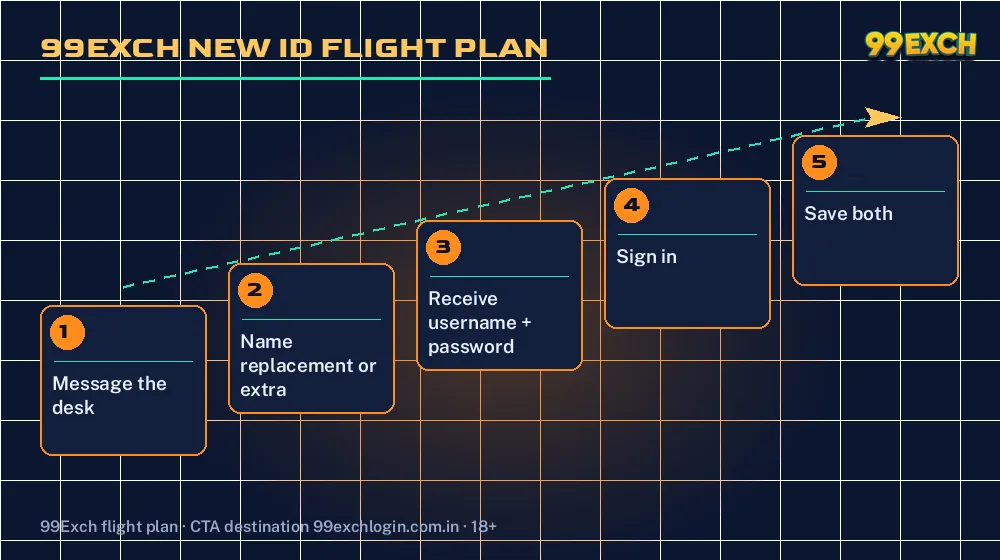
ClearanceApplying takes one chat and a little care with what you type. No form on this site collects anything; the 99Exch desk works entirely inside WhatsApp, and the official login sits at 99exchlogin.com.in. Six moves, in this order:
- Pick the handset you will keep using and add +91 81097 11726 to it as 99Exch desk; the reply, and your only copy of the new call sign, will live on that phone.
- Open with the job title, replacement 99Exch ID or extra 99Exch ID, on one line with no backstory.
- On a replacement, follow with the retired username, or the words old username lost when nothing survives.
- Leave the conversation quiet until the desk writes back; username and password travel together in that one reply.
- Run the pair on 99exchlogin.com.in while the chat is still open, so a refused attempt can be raised in the same sitting.
- Write both halves down away from WhatsApp, tagged with the ID they belong to.
A sample opening message, if you would rather not compose one from scratch:
You: Hi, 99Exch desk. I need a replacement ID.
You: Old username: the one from your notes, or lost if you have nothing.
You: Please send the new ID number and password here.
That is genuinely enough. Long explanations about why you need the 99Exch new ID tend to bury the one line the desk needs, which is the requst type, and a reply that has to ask a follow-up question only adds a round trip. How quickly the answer comes back is not something this page can tell you, so we will not guess at a figure. Short and specific works.
Step five deserves a word. Testing the 99Exch new ID while the desk thred is still on screen turns a failed attempt into a one-line follow-up instead of a fresh conversation next week, when nobody, you included, remembers which username was which (it happens to tidy people too). Not sure the contact you stored is the right one? Check it against how the 99Exch desk contact is written before the old username goes anywhere.

After Your 99Exch New ID Arrives — Safe First Sign-In Checks
TouchdownThe reply is in. Before you do anything else, read what the 99Exch desk sent, because the message carries everything you need for the first sign-in:
Most first sign-ins go through without a hitch. When one does not, the cause is nearly always small, and it is usually one of the following.
Username refused. Count the characters. If the box holds one more than the desk reply, a stray space or full stop rode along with the paste, so delete it or key in the 99Exch new ID number yourself.
Old username typed by habit. This happens far more than anyone admits. After a replacement, your fingers may still produce the previous call sign; check which one is in the box.
Two IDs, one phone. With an extra 99Exch ID, a saved browser login can fill in the wrong pair. Clear the saved entry or pick the right one from the list, and keep your written labels close.
Address stalls before the form appears. That points at the domain, not at your fresh call sign, and the 99Exch new ID is not the thing to replace again. Any live mirror listed in the 99Exch home lobby takes the same pair.
iPhone users sign in through the browser, since the app is an Android download and not a Play Store listing; the new ID behaves the same there. And if a balance question is still open from a replaced account, raise it in that one desk thread, where the history of your request already sits, rather than starting a fresh chat that has none of the context. Probably the single most useful habit with any 99Exch new ID, in practice, is boring: write the pair down the day it arrives.
99Exch New ID Questions — Quick Answers From the Desk Route
How do I get a 99Exch new ID?
You apply with a single WhatsApp request to +91 81097 11726 that names the job, replacement or extra, plus the old username if one survives. Inside that thread the 99Exch desk answers with a fresh username and password, which you test on the official login before writing them into your own notes.
What does 99Exch new ID number mean?
It refers to the login username the desk writes into its reply for your new 99Exch account. Type it exactly as sent in the username box on 99exchlogin.com.in, with the password in the box below. Anything else from the chat, such as the desk contact or your own mobile, stays out of the form.
Can I hold two 99Exch IDs at the same time?
Ask and see. A second 99Exch ID starts as a WhatsApp request made beside your current one, and the desk reply in that chat settles it. Should a second ID be issued, each signs in with its own username and password, so label the two pairs clearly and never mix them on the login screen. Two pairs, two labels.