My 99 Exchange — Secure Wallet Hangar for UPI Deposits, Statements and Cash-Out Requests
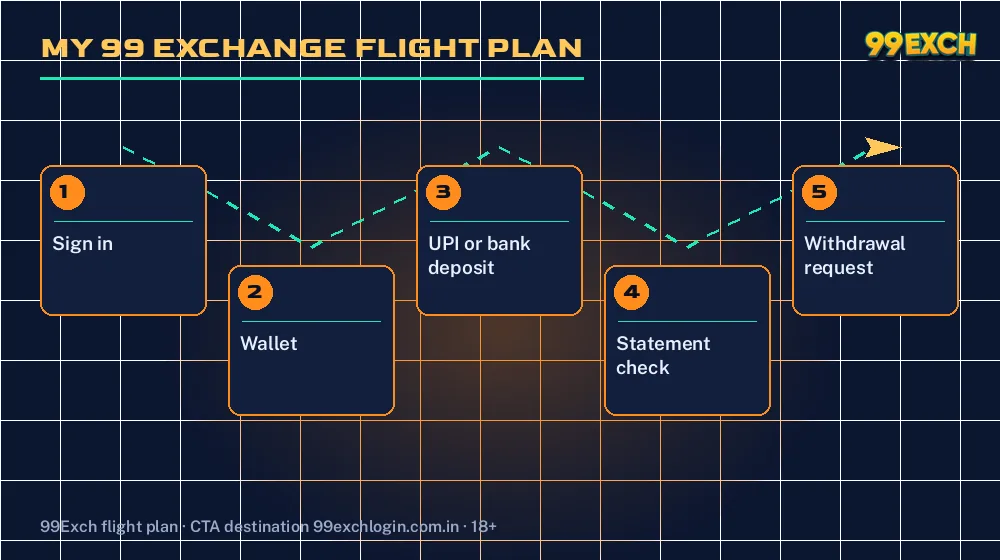
Signed in to 99Exch and looking for your money? My 99 Exchange is that corner of the account: the wallet balance at the top, a UPI or bank transfer to top it up, a statement to check against your bank app, and a cash-out request raised on the WhatsApp chat. The hangar below parks each job in its own bay.
Wallet, statement and cash-out requests all sit behind one 99Exch username and password.
My 99 Exchange Wallet Login — Fast Deposit and Withdrawal Desk
The balance, the deposit request and the statement only appear once the 99Exch portal accepts your username and password, so this card is the first door.
My 99 Exchange Wallet View — What the Secure Account Area Holds
Wallet map
People search for my 99 exchange for one plain reason. They want to see their money. Cricket markets, the live casino rooms and the aviator round all draw from a single 99Exch balance, and My 99 Exchange is simply the name players give to the part of the account where that balance lives, along with the record of how it got there and where it went.
Nothing on this side needs a second sign-up. The username and password that open the 99Exch cricket book open the wallet as well, whether you come in through a browser or through the Android app. Same login, same money.
A practice account is the exception, and it ctches people out. A 99Exch Demo ID runs on a practice balance: no deposit goes in, no real payout comes out, so a demo wallet has nothing that can be withdrawn. If the number on your screen arrived with a demo login, that is why the cash-out route looks shut.
What the wallet does not do is just as useful to know. It is a running balance for play, topped up by your requests and drawn down by bets or by withdrawals. Treat it that way and the statement makes immediate sense.
Switching address does not create a second wallet. Sign in on any working 99Exch address and the figure is identical, because a balance is a property of the ID; a block on one domain can hide the doorway for a while, but it cannot touch what sits behind it (the address bar is just the hangar door, not the hangar).
BalanceThe figure the 99Exch wallet shows after login; identical on every working mirror.
Deposit requestYour chat message saying you are adding funds by UPI or bank transfer.
Withdrawal requestYour chat message asking for part of the balance to go back to your own account.
StatementThe running record of money moving into and out of the ID.
UPIIndia's instant payment rail, used from the bank app on your own phone.
Bank transferThe second rail, paid from your bank account to details the desk shares.
UsernameThe login name from your WhatsApp chat; quote it in every money message.
99Exch Deposit and Withdrawal Side by Side — A Clear Two-Way Flow
Two lanes
Both directions pass through the same two places. The 99Exch site is where you watch the balance; the WhatsApp desk is where a request actually gets handled. What changes between the lanes is who sends money to whom, and which detail you have to supply before anything moves.
99Exch Deposit Lane — Quick UPI or Bank Route
You open it: a chat message with your username and the rail, UPI or bank transfer.
The desk replies with payment details inside that same chat.
You pay from your own bank app and keep the reference number it shows.
You send the reference back, then refresh the wallet once the desk confirms.
99Exch Withdrawal Lane — Verified Cash-Out Route
You open it too: username, the amount you want out, and where it should land.
Your payout handle goes in the same note, copied from your bank app rather than recalled.
The desk handles the transfer and may ask a question in the thread first.
Proof arrives twice: once as a bank credit, once as a statement line.
This site publishes no amount, limit, fee or clock for either lane, and it would be guesswork to invent one, so the only party who can speak about a specific 99Exch deposit or withdrawal is the desk that is handling it, inside your own chat thread.
A small habit pays off here. One message, not five. Write the request in a single block: username first, then the direction (in or out), then the rail. The desk reads it once and has everything. Simple, and it saves a round of questions.
99Exch Deposit Steps — Fast UPI and Bank Transfer Request
Inbound
Adding money is a short conversation, not a form. You will need three things to hand: your 99Exch username, a bank app on your phone with UPI set up (or net banking for a transfer), and the WhatsApp number of the desk, which is listed with the 99Exch WhatsApp number details along with how to save it.
Sign in on the 99Exch portal and note the current balance before you pay anything. The real login form sits behind a reCAPTCHA check, so tick it when it appears.
Open the chat with the desk on +91 81097 11726 and write that you want to make a 99Exch deposit, with your username in that same message.
Say which rail you will use: UPI or bank transfer.
The reply from the 99Exch desk carries the payment details. Treat that reply as the only valid source; details passed on by a friend, a channel post or an old chat may be out of date.
Complete the payment in a bank app registered to you, and screenshot the success screen with its UPI reference or transaction ID before you close it.
Send that reference back in the chat. Once the desk confirms, refresh the wallet and check the new balance against what you paid.
You: Deposit request, ID [your username], paying by UPI. Desk: sends the payment details in this chat You: Paid. UPI reference from my bank app attached as a screenshot.
That message pattern is deliberately dull. A username, a direction and a rail are the three facts any desk needs before it can match money to an account, and a reference number is the fourth, the one that ties a bank debit to your 99Exch ID instaed of to somebody else's.
What if the money has left your bank and the balance has not moved? Never pay twice. Send the same reference again in the same thread and wait for a reply there, because two payments for one request are much harder to untangle than one payment that is slow to show; start a fresh chat and the history is split across two places, which helps nobody. Well, almost nobody. The only gain from a second payment is a second problem.
99Exch UPI Deposit — Quick Phone-Only Route
UPI suits most players because the whole job stays on one phone: chat on WhatsApp, switch to the bank app, pay, screenshot, switch back. The reference appears on the success screen the moment the payment goes through, which makes matching easy later.
99Exch Bank Transfer — Reliable Account-to-Account Route
A transfer from net banking needs more typing (account number, IFSC, name) and gives you a transaction ID instead of a UPI reference. Choose it if your UPI app has trouble, or if you simply prefer paying from the bank's own site.
Bank transfer works the same way, just with account detils in place of a UPI handle. Type them from the chat into your bank app carefully, character by character if you have to, because a 99Exch deposit sent to a mistyped account is a matter between you and your bank, not the desk.
99Exch Withdrawal Request — Secure Cash-Out Steps on Chat
Outbound
Taking money out is a request you send, not a button that pays you on the spot. At least, that is how the desk route works for a 99Exch withdrawal: you ask, the desk processes, and your bank shows the credit when it lands.
Sign in and confirm the balance you want to take out is real money, not a demo practice figure.
Let open bets settle first. Money still riding on an unsettled market usually is not free balance yet.
Write your cash-out line in a fixed order, username then figure then destination, so the 99Exch desk reads it top to bottom without scrolling back up the chat.
For the destination, paste a UPI handle or the account number, IFSC and holder name straight from your bank app instead of typing them from memory.
Answer any check the desk raises in the same thread; do not open a second chat.
When the desk says the transfer is done, look in your bank app first and the statement second.
Which payout route to give? A UPI ID is short and quick to type, so there is less room for a slip. Full bank details take longer but suit anyone whose UPI app is linked to a different account from the one they want paid. Either way, give the 99Exch desk a destination that belongs to you, and give the same one each time so the history stays easy to follow.
Most cash-out delays that players describe come down to one of two things. Either the payout details had a slip in them (a wrong IFSC, one digit missing from the account number, a UPI handle typed with the wrong suffix), or the request was split across several messages and nobody could tell which amount was meant.
So read your payout details twice before you hit send, keep the request in a single message, and if the desk comes back saying a transfer bounced, reply with the corrected detail in that same thread rather than starting over, because the original request and its history stay attached to your 99Exch ID there.
One more case. If a withdrawal is pending and you place new bets from the same balance, the figure you asked for may no longer be there when the desk looks; leave the balance alone until the request is finished. Same goes for switching mirrors mid-request: harmless for the balance, since the ID is the same everywhere, but confusing if you then ask the desk why the figure looks different on another address. It will not be different. If it is, screenshot both and send them. Patience, mostly. And if the amounts you are moving start to outgrow what you planned, the 99Exch responsible gaming page sets out self-chosen limits and a free helpline.
My 99 Exchange Statement — Reading Every Line with Clear Records
Logbook
The statement is the page that settles arguments. Every deposit the desk credits, every withdrawal it pays and every bet that settles moves the 99Exch balance, and the statement is where those movements are written down in order, so that the figure at the top of the wallet can be traced back to the events that produced it.
Finding it is not hard. After login, look in the account menu; the statement entry sits beside the wallet items and lists money moving in and out. Hard to say which label your mirror shows on a given day, but the content is the same, because the history belongs to the 99Exch ID and not to the address.
Open your bank app beside the statement, on the same date range.
For each deposit line, find the matching debit and its reference number.
For each withdrawal line, find the matching credit in the bank app.
For bet lines, compare against the market you played on 99Exch live cricket and casino, which settle into the same balance.
If something does not match, screenshot both screens and send them to the desk in one message.
Do this once a week and it takes a few minutes. Leave it for three months and it becomes an afternoon. A statement check is also the quickest way to answer the question players ask the 99Exch desk most often about money, which is whether a payment arrived at all, because the line is either there or it is not.
A worked example, without figures. You send a UPI deposit on Monday and keep the reference; the desk confirms and the wallet rises. On Tuesday you play a few cricket markets, and two settle in your favour while one does not. On Thursday you raise a withdrawal request for part of the balance. Open the statement on Friday and you should see, in order, one deposit line, three bet lines and one withdrawal line, and your bank app should show one debit on Monday and one credit after Thursday. Five lines, two bank entries, everything accounted for.
Keep your own short log, too. Date, direction, rail, reference. Four columns in a notes app is enough. When the desk asks for a reference from six weeks ago, you will have it in seconds instead of scrolling through a bank app with a thousand UPI payments for groceries in it.
My 99 Exchange Login Trouble Before a Deposit — Quick Fixes That Work
Ground crew
Most money questions are really sign-in questions. If the wallet will not open, nothing else on this page can happen, so here are the snags that stop a My 99 Exchange session before the balance even shows, and what usually clears them.
A blank screen where the wallet should be. Before you message anyone about missing money, open the page on another working 99Exch address; a provider block on one domain can look exactly like an empty account, and the 99Exch home page keeps the current routes in one spot.
Sign-in bounces back to the form. Look for a stray space that came along when you pasted the username out of the chat. If the form still turns you away, the desk can issue fresh details in that same thread.
A zero where the balance should be. The demo button and the real sign-in sit side by side on the 99Exch form; a demo session loads practice credit, never your deposits, so sign out and use the real details.
Two devices, two different figures. Phone and laptop signed in to one 99Exch ID share a single balance, but a tab left open for hours may not refresh itself. Reload both before you trust either number.
The deposit left the bank but the wallet looks unchanged. Refresh, or sign out and back in. Still unchanged? Send the reference to the desk in your existing thread, as in the deposit steps above.
No reply yet from the desk. Keep the one thread. Sending the same request five times only pushes your first message further up the chat.
There is no separate my 99 exchange login to hunt for, by the way. The search phrase and the portal sign-in are the same thing: one 99Exch username, one password, on browser or app, on whichever mirror is answering today. Nothing more to it.
If you are not sure whether your problem is a login issue or a wallet issue, describe what the screen shows when you message the desk (the exact words, or a screenshot) and say whether you were trying to make a 99Exch deposit, a withdrawal, or simply see the balance; that one sentence lets the reply go straight to the right fix.
Players also search
my 99 exchange
my 99 exchange login
my 99exch
99exch deposit
99exch withdrawal
my 99exch wallet
99exch upi deposit
my 99 exchange statement
99 exchange withdrawal request
My 99Exch Wallet Searches — Verified Terms Behind Each Query
Where the my 99 exchange search lands — the secure wallet side
Someone typing my 99 exchange is almost never looking for the lobby. They want their own figures: the balance, what went in, what came out. That is the account area of the 99Exch ID, and this page keeps to it.
The shorter form my 99exch points to the same place. Spacing in a search box changes nothing about the account behind it. Same account, either spelling.
wallet balance read straight after sign-in
deposit and cash-out requests raised on the WhatsApp chat
statement lines matched against your bank app
How 99exch deposit and 99exch withdrawal read here — clear request terms
Both phrases describe a chat request rather than a self-serve form, with UPI and bank transfer as the two Indian rails.
99exch deposit
username plus rail sent to the desk, payment to the details it returns, reference sent back
99exch withdrawal
a cash-out note naming the ID, the figure and a payout handle that is yours, with the money returning along UPI or a bank rail
statement check
each credited or paid line found again in the bank app
Why my 99 exchange login is the official 99Exch sign-in
The my 99 exchange login is not a second portal. It is the normal 99Exch username and password, on the browser or the Android app and on any working mirror, and it opens the wallet together with every market on the same ID.
My 99 Exchange Hangar FAQ — Trusted Answers on Wallet Money
What is My 99 Exchange?
Think of it as your 99Exch account seen from the money end. The balance, each deposit or cash-out you have asked for, and the statement all live there, reached with the ordinary username and password; nobody registers for it separately, and it looks the same in a browser or in the Android app.
How do I make a 99Exch deposit?
Through the WhatsApp desk, because a 99Exch deposit is a request rather than a checkout page. UPI is the quicker rail for phone users, while bank transfer suits anyone paying from net banking. Either way the desk replies with where to pay, and the reference number from your bank is what ties that money to your username.
How does a 99Exch withdrawal work?
Cash-outs on 99Exch begin with a chat message, since the desk handles each one rather than an instant button. Put the username, the figure and your payout handle in a single note, reply to any check in that thread, and confirm the credit twice, in the bank app and on the statement. Demo credit never qualifies.
Where can I find my 99 Exchange statement?
Your 99 Exchange statement is in the account menu after login, beside the wallet balance and the deposit and cash-out entries. It lists money moving in and out of the ID. If a line looks wrong, take a screenshot of it next to your bank record and send both to the 99Exch desk.
Is my 99 exchange login different from the normal 99Exch login?
No, my 99 exchange login is the same 99Exch login. One username and password open the wallet, the cricket book and the casino lobby, on the browser and the Android app alike, and on any working mirror address. If your details stop working, ask the WhatsApp desk for a reset.