
99Exch Login — Official Preflight From Your Call Sign to the First Lobby Screen
Open 99exchlogin.com.in and the 99Exch login form wants three things before it lets you through: the user name the WhatsApp desk sent you, the password that came with it, and a ticked reCAPTCHA box. Press Login after the tick and the lobby loads with the cricket desk, the other sports and the casino rooms. Every slot is broken down below.

99Exch Login Cockpit — Secure Sign-In With Your Call Sign
These two slots mirror the order of the real 99Exch sign-in screen, so the button below drops you on the first one with nothing left to guess.
Players also search
- 99exch login
- 99exch login id
- 99exch login password
- 99 exch login
- 99exch login with demo id
- 99exch login mobile
- 99exch sign in
- 99exch login kaise kare
- 99exch user name login
- 99exch login page
99Exch Login Search Words Mapped to Each Slot — Clear Pointers
Searching 99Exch login with a fresh ID from the support chat
Searchers typing 99exch login are mostly mid-task: a call sign and a password already sit in their WhatsApp chat from the day the desk opened the account. The gap is the screen itself and the sequence it expects, which is the whole reason this page is laid out slot by slot.
When 99Exch login means the official sign-in address
Every runway button on this page, the cockpit card included, lands on 99exchlogin.com.in, and that portal is the only place your 99Exch password belongs. A search result or forwarded link asking for it on some other address is something else entirely. Close that tab.
Typing 99Exch login ID and password in the quick order
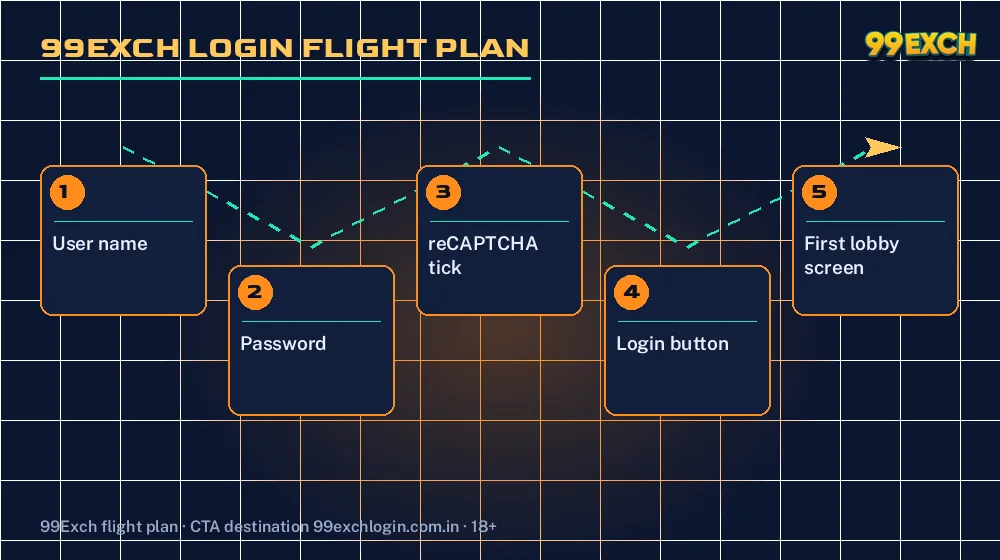
User name first, password second, reCAPTCHA tick third, the Login button last. People search for 99exch login id and 99exch login password as two separate questions, yet on the screen they are two slots stacked one above the other, filled in one sitting, and the walk further down covers each of them.
99Exch login on a phone: same secure screen, smaller keyboard
A mobile 99Exch login uses the same slots in the same order, whether you sign in from a phone browser or from the Android app. Only the keyboard changes. The keyboard is also where most phone typos start, which the user name section deals with.
Free 99Exch login practice sits on the demo button, not in your WhatsApp chat
Before the 99Exch Login: Quick Preflight Kit to Have in Hand
Preflight kitFour things decide whether a 99Exch login goes through on the first try. You either have them or you do not. Gather them before you open the portal, because hunting for a password while the reCAPTCHA tick sits there waiting is how a two-minute job turns into a twenty-minute one.
- User name
- The call sign the 99Exch desk typed into your chat. Star that message today; slot one depends on it.
- Password
- Posted in that thread as well. After any reset, only the newest one in the thread gets you past slot two.
- Address
- The portal at 99exchlogin.com.in, which every login button here opens in a new tab.
- Age
- 18 or over. The 99Exch ID is for adults only.
Without a call sign the form has nothing to check, so retrying it is wasted effort. Getting one is a WhatsApp job: save +91 81097 11726 as a contact, message the 99Exch support desk, and the ID details get posted back into that thread. What the account covers once it exists is laid out on the 99Exch ID page; this page sticks to the sign-in form and its slots.
One more choice to make before starting: browser or app. A 99Exch login works the same way in Chrome on a phone, in a desktop browser, or inside the Android app, which installs as an .apk file and is not listed on the Play Store. iPhone users stay in the browser. If you are still deciding between the two routes, the 99 Exchange login comparison puts them side by side; here we assume whichever one you already have open.
99Exch Login Step Walk: Official Order From First Slot to Lobby
ChecklistThis is the full 99Exch login run, in the order the screen asks for it. Seven moves. Each one names the thing you touch and what should appear once you have touched it, so if the screen shows something different you know exactly which step went sideways.
- Taxi to the sign-in screen. Any login button here opens 99exchlogin.com.in in a fresh tab; you are in the right place when the 99Exch form shows an empty user name slot at the top and nothing has been typed anywhere yet.
- Slot one, the call sign. Put the user name in character for character as the desk wrote it in WhatsApp; the cockpit card near the top of this page mimics the same slot, and the user name section further down lists the phone habits that quietly break it.
- Slot two, the password. Every key you press becomes a dot, so this is the one slot where speed works against you; type at half pace and, if it was ever reset, use the newer password rather than the one from the very first message.
- Slot three, the robot check. Leave the reCAPTCHA box until both slots are full, then touch it and wait for the tick mark, solving the occasional picture grid if Google decides to show one first.
- Choose the right button. Two buttons share the form, and only the main Login button carries your typed details into your account; its neighbour, Login with Demo ID, belongs to the practice section further down this page.
- Watch the screen change. The form gives way to the 99Exch lobby, and the arrivals board two sections below lists what should be on it: the cricket desk, the other sports, the casino rooms and the crash games.
- Read the balance before anything else. A practice figure where your own balance should be is the giveaway that step five went to the demo button; return to the form and fly step five again.
That is the whole sequence. Nothing about it changes between a phone and a laptop, and nothing changes if you came in through a mirror address instead of the main one, because the 99Exch user name and password stay the same wherever the form loads. If any single step refuses to move, the sections below take each slot apart in more detail, and the password-reset and error cases live on the error fixes on the 99Exch com login page rather than here.
A small habit helps (it costs about three seconds): before pressing Login, glance back up at the user name slot. Phones love to auto-capitalise the first letter or add a trailing space after a paste, and both are invisible until the form says no.
99Exch Login User Name Slot: Easy Rules for Typing Your Call Sign
Slot oneThe user name is the first slot on the 99Exch sign-in screen and the one people get wrong most often. It is short. That is exactly why a single stray character breaks it.
Start from the WhatsApp chat, not from memory. Open the message the 99Exch desk sent, read the user name off the screen and type it in yourself, or long-press to copy it and paste it into the slot. Both work. Pasting is faster, though it drags along whatever sits next to the word, and on most phones that means a space at the end that you cannot see once the text is inside the slot.
Case is the next trap. Treat the 99Exch user name as case-sensitive, because there is no reason to find out the hard way whether it is; if the chat shows lower-case letters, type lower-case letters. Phone keyboards tend to capitalise the first letter of anything you type into an empty box, so check that first character before moving on.
ATC, slot one: user name in, no leading space, no trailing space, first letter matches the chat. Move to slot two.
Then there is autofil. Browsers like to suggest whatever was typed into a similar box last time, and if you or someone else on that phone once signed in with a different user name, the suggestion will happily fill the old one. Tap the slot, dismiss the suggestion, and type your own. On a shared family phone this matters more than anywhere else, since the wrong ID loads a different balance and a different history, and nothing on the 99Exch lobby screen will shout that it belongs to someone else.
The opposite mistake happens too. Some people type the user name into the password slot, or the password into the user name slot, when the keyboard pops up and covers half the form. On a small screen, scroll so both slots are visible before you start. Probably the cheapest fix on this whole page.
99Exch Login Password and reCAPTCHA: Secure Second and Third Checks
Slots two, threeSlot two and the check box beneath it are where a 99Exch login either clears or stalls. They work differently. One is about what you type, the other is the portal confirming that a person, not a script, is the one typing, and treating them as separate checks makes a failure much easier to read.
The password slot. Dots replace what you type, which removes any chance to spot a slip by eye. One slow pass beats two quick ones. Where the slot or the browser provides a show-password toggle, flip it on and read the characters against the chat. And if the desk has reset the password since your first message, the 99Exch form wants the reset one.
The reCAPTCHA box. It guards the genuine 99Exch form against scripted sign-in attempts, and on most visits one tap turns it into a tick. Occasionally Google wants a picture round first (traffic lights, buses, that sort of thing). If the page then sits untouched for a while, the tick can expire and asks for a fresh tap before Login will go.
Order matters a little here. Fill both slots first and tick the box last, right before pressing Login, because a tick that sat there while you went back to the WhatsApp chat to check a character may have run out by the time you return. That is the theory, at least; in practice the box is forgiving and a second tick almost always does it.
ATC, slots two and three: password typed, compared against the chat, box ticked last. Cleared for Login.
What if the form still refuses? A wrong-password message, a locked ID, a reCAPTCHA loop that will not clear, or the old habit of typing http instead of https: those cases each have a fix, and they are written out in full on the 99Exch com login troubleshooting walk, along with the password reset that goes through the WhatsApp desk. Repeating them here would only split the same answers across two 99Exch pages.
Past the 99Exch Login Form: Live Arrivals Board for Your First Lobby Screen
ArrivalsPress Login and the sign-in form disappears. In its place comes the 99Exch lobby, and the first look can be a lot at once, because a single ID opens the cricket book, the other sport markets, the live casino tables and the crash games from the same screen. The exact arrangement is the portal's to change, so read the board below as a list of what to look for rather than a pixel map.
- Cricket desk
- Match markets, IPL included when the season runs.
- Other sports
- Football, tennis, kabaddi and horse racing markets.
- Exchange boards
- Back and lay prices, now visible because you are signed in.
- Sportsbook
- The fixed-odds side, next to the exchange.
- Live casino
- Teen patti, andar bahar, roulette, blackjack, dragon tiger.
- Crash games
- Aviator, mines and colour prediction.
Prices are the clearest sign the 99Exch login worked. Before signing in, market boards on this site show only a sample layout with the prices held back; after signing in, the portal fills them. If you see a lobby but every price cell is blank or asks you to log in, you are looking at a page that loaded before the session did. Refresh once.
Wallet actions start from inside the lobby too. Deposits and withdrawals run on Indian rails such as UPI and bank transfer, and any help with them goes thorugh the same WhatsApp desk. We do not quote amounts or timings here, because the portal does not publish them.
Where to go first? That depends on why you logged in. For a match, start at the cricket desk. For a quick table, the casino rooms. Nothing needs setting up before you browse, and the same 99Exch ID opens all of it, so there is no second sign-in waiting behind the casino section or the crash games.
99Exch Login With Demo ID: Where the Free Practice Button Sits
Demo bayThe demo entry is not hidden on another page. It is a second button on the same 99Exch sign-in screen, labelled Login with Demo ID, sitting with the main Login button. Two buttons, one form. Press the wrong one and you end up somewhere that looks almost identical to your own lobby, which is exactly why people mix them up.
Main Login, the left seat. Flies the call sign and password sitting in the cockpit slots, so whatever balance appears afterwards is the one tied to your own 99Exch ID.
Login with Demo ID, the training seat. Lands on a balance that was never funded and can never be cashed out, which makes it a safe place to learn the lobby and nothing more.
Where the training seat earns its place is a first visit: some time clicking around the practice lobby means the sport desks, exchange boards and casino rooms already look familiar when you come back with your own 99Exch user name, so the first funded session is not spent searching for where the cricket markets live. Everything else about the demo, including what the practice balance can and cnnot do, sits on the 99Exch home lobby page, which owns that topic.
The reverse slip is the one worth catching. You meant to sign in properly, the screen looks right, and only later do you notice the balance is the practice figure. Back out, return to the sign-in screen, and press the main Login button this time.
99Exch Login Worked Example: A Real Phone Sign-In, Slot by Slot
Sample runHere is how a typical 99Exch login on a phone plays out, with the small snags that actually happen. Composite case, not one person. Read it as a dry run of the steps above with the mistakes left in, since watching a step go wrong once is usually what makes it stick.
Setup and first move: Android phone, Chrome, and a WhatsApp chat from the 99Exch desk holding the user name and password. The player starts from this page's runway button, so the sign-in screen opens in a new tab while this page stays behind in the old one, which is handy for checking a step without losing the form.
Slots one and two: the call sign gets lifted out of WhatsApp with a long-press and dropped into slot one, and an invisible space rides along at the end; it is deleted before going on. The password, by contrast, is keyed in by hand at half speed and checked with the show-password option, because a paste into a masked slot gives no visual proof of what landed.
Slot three and the landing: the reCAPTCHA box asks for a picture grid this time. Squares picked, tick showing. Main Login button next, the lobby replaces the form, the cricket desk fills with prices, and the balance on screen is the funded one.
Two details in that run do most of the work. The space after the paste is the most common silent failure on a phone, and switching apps between moves two and three is exactly when a reCAPTCHA tick can lapse, which is why the box came last. Done in that order, a 99Exch login is short.
Same run on a laptop? Almost identical, just with a real keyboard and fewer autofill surprises. In the Android app the slots and the order are the same as well; if the app is not installed yet, the 99Exch APK download page explains the install, and the same user name and password work inside it from the first launch.
The second sign-in, a day later, is shorter still. Browsers usually remember a correctly typed user name, so slot one may already be filled when the 99Exch screen opens; check it against the chat once more, especially on a phone other people use, then type the password and tick the box as before. On an iPhone, adding the portal to the home screen from the browser's share menu puts the 99Exch sign-in one tap away. Expect the reCAPTCHA box every time, though. It belongs to the form.
Blank page, spinning tab, or an address that never answers? Then the form was never reached, and the problem is the domain, not your details. Indian internet providers do block betting domains, so mirror addresses exist; in our 12 Oct 2026 check, 99exch.red, 99exch.green, 99exch.win and 99exch.live all opened the same 99Exch login screen, and the same call sign and password work wherever it loads.
99Exch Login Questions: Clear Answers on ID, Password and Mobile
How do I complete a 99Exch login?
Open the portal at 99exchlogin.com.in, type your user name into the first slot and your password into the second, tick the reCAPTCHA box and press the main Login button. The 99Exch lobby with the sport desks and casino rooms loads next. The same order works in a phone browser, a desktop browser and the Android app.
Where do I find my 99Exch login ID?
It is the user name sitting in your WhatsApp chat with the 99Exch desk, from the day the account was made. Pin or star that message so it stays one tap away, then copy it character for character into slot one. The sign-in screen itself never displays it, which is why that saved message matters.
What should I do if I forgot my 99Exch login password?
Nothing on the sign-in form recovers it; a lost 99Exch password comes back through the WhatsApp desk, which posts a replacement into your chat. Copy that new one carefully and treat the old one as retired. The full reset request and the error messages you might meet along the way are covered on our 99Exch com login page.
Is the 99Exch login safe to use?
Signing in is safe when it happens on the right address: the 99Exch form at 99exchlogin.com.in sits behind a reCAPTCHA check, and it is the only portal our buttons open. Trouble usually starts somewhere else, with a forwarded link or a shared WhatsApp chat, so keep your details to yourself. Accounts are for adults aged 18 and over.
Can I do the 99Exch login on my mobile?
Yes. A phone needs nothing extra for a 99Exch login: open the portal in Chrome, Safari or any other mobile browser, or use the Android APK app if you installed it, and the same call sign and password go into the same slots. The one phone-specific risk is the keyboard, which can capitalise or add spaces without asking.
Can I try a 99Exch login with a demo ID first?
Yes. Look for the Login with Demo ID button on the same sign-in form as the main Login button; pressing it puts you on a practice balance with no money paid in and no withdrawal possible. A dry run, basically. Switch to the main button and your own user name for the real account.