99 Exchange Sign Up — Official Boarding Over One WhatsApp Thread, Demo Seat First
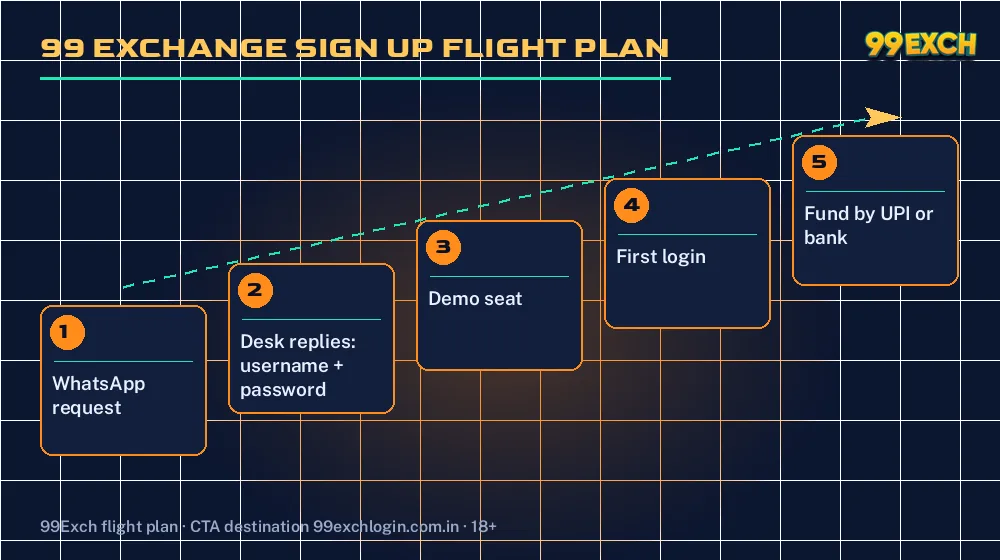
99 Exchange sign up runs through a single WhatsApp chat with the 99Exch desk on +91 81097 11726: you send a short request, the desk sends a username and password back into that same thread, and you log in. Before you fund anything, the free Demo ID on the 99Exch login screen gives you a practice balance to try first.
Sign-up counter: the request goes out on WhatsApp, the username and password come back in the same thread.
99 Exchange Sign Up Counter — Official Pass in One WhatsApp Chat
Think of this as the gate at the end of the sign-up corridor: the two credentials from your 99Exch chat belong in these boxes on the real form, reached through the button below.
What to Send for a 99Exch Sign Up — Quick Opening Message
Outbound text
No form. That surprises people who arrive expecting an email box and a tick-list, but a 99Exch sign up is a conversation, and the first line of it is yours. Every button on these runway pages points at the 99Exch login portal; none of them collects your details, because the accunt itself is opened by the support desk inside WhatsApp.
Your share of the work is one text to +91 81097 11726, sent from the phone you intend to keep for this account. Everything after that is a reply to whatever comes back.
Why chat instead of a web form? We can describe how the 99Exch portal handles registration, not why it chose this route. The practical effect is what counts: the thread you open today doubles as the help line for this account later, so the first message is also the start of your account record.
Easy 99Exch readiness check before you type
Three decisions, made before the chat rather than during it. Which WhatsApp number will own this 99Exch ID for good? Are you 18 or older (the service is adults only, no exceptions)? And do you want to look around on the free demo first, or go straight to a real account? None of these takes long. Getting the first one wrong is the only one that costs you later.
Fast 99Exch register message you can adapt
YOU Hello, I would like to 99Exch register a new ID. I am over 18.
DESK Replies in the same chat and asks for whatever it needs to open the ID.
YOU Answer those questions in that thread, nowhere else.
DESK Sends your username and password.
What the 99Exch desk asks — a clear note on the questions
We do not print a fixed list of required details, and that is deliberate. The portal has not published one, the desk decides what it needs when it opens an ID, and a made-up checklist on this page would send you into the chat with the wrong answers ready. So the rule is simpler: read each question the desk sends, answer it in the same thread, and ask back if something is unclear.
Picture the chat six weeks from now. You want a password reset, or you have a deposit question, and the desk scrolls up to see who you are; if your 99Exch registration started on a spouse's phone and the follow-up arrives from yours, that scroll shows nothing. Two phones, two half-histories. In practice most mix-ups start exactly there.
Register, sign up or new ID — which 99Exch wording is best
Any of them works for a first account. Register, sign up, open an account, new ID: the desk reads them all as the same request when you have never held a 99Exch username before.
The one exception is a second account, or a replacement for an ID you already had and lost. Say that plainly in the first line, because it is a different request from a fresh registration, and the replacement route on the 99Exch new ID page covers it on its own. Mixing the two up is how people end up with two usernames and no idea which one holds their balance. Annoying, and avoidable.
99 Exchange Sign Up Sequence — Clear Order From Chat to Lobby
Flight order
Seven moves, in this order. Skipping ahead is possible (the demo option, for one, sits on the login screen before any chat), but this is the sequence that leaves the fewest loose ends on a new 99Exch account.
Pick the owning phone. The WhatsApp account that sends message one becomes the thread every later 99Exch request runs through, so choose it before anything else.
Open a chat with +91 81097 11726. One thread, started once, kept for good.
Ask to register. One sentence will do: that you are new to 99Exch, want an account, and are 18+.
Answer each desk question. Reply in that chat, one answer per question, until the desk says the ID is ready.
Lift the two credentials out. Paste the username and password into a notes app and trim any space at either end.
Rehearse on the demo seat. The demo option beside LOGIN costs nothing and pays nothing, a rehearsal before your own pair goes in.
Carry the trimmed pair to the real form. Username, password, the reCAPTCHA tick, then LOGIN, and the lobby is yours.
Step six is the one most people skip. It costs nothing, though.
Steps five and seven are where errors creep in, because a password copied out of a chat bubble sometimes drags a space or a line break along with it, the login form reads that as a different password, and the screen refuses you even though every visible character looks right. Paste it into a notes app first, check both ends, then carry it into the 99Exch form.
Funding comes after all seven, never before. The desk helps with deposits over UPI or bank transfer once your username exists; amounts, limits and timings are not published, so none appear here, and the deposit flow itself belongs to the wallet side of your account. Probably the safest habit is the plainest one: ask in your sign-up chat before you move any money, and keep the reply.
A real-shape 99Exch sign up thread, annotated
What follows is a composite, not a transcript. It shows the shape a typical 99Exch registration chat takes and what to do at each turn, with the desk's lines kept general on purpose, since we will not put words in its mouth.
1 · YOU Hi, new here. I want to sign up for a 99Exch ID. I am 18+.
2 · DESK Acknowledges and sends its first question. Read it twice before answering.
3 · YOU Short, direct answer. If you are unsure what it means, ask. Do not guess.
4 · DESK Any follow-up questions, then confirmation that the ID is ready.
5 · DESK Username and password, as messages in this thread.
6 · YOU A one-line thank-you is fine. Then stop typing and go log in.
Line six sounds trivial. It is not quite: people often keep chatting in the thread while the reCAPTCHA times out on the other tab, then wonder why the 99Exch form has reset itself. Finish the chat, then do the login in one go.
Signing up on a live 99Exch match day — a fast-start note
Say you decide on an IPL evening, an hour before the first ball, that you want an account. Fine. But no setup time is published for a 99Exch registration, and the questions take as long as they take, so the realistic plan is to send the request well before the match you have in mind rather than at the toss. Use the gap on the demo seat. By the time your own username lands, the 99Exch menus will already feel familiar, and you will not be learning where the cricket book sits while the overs tick by.
What the 99Exch Register Reply Carries — Verified Username, Easy First Login
Inbound
The reply is short. Two items matter, and the rest of this list is about where you can use them.
Username
Sent by the desk as a WhatsApp message in your sign-up thread
Password
Arrives in the same chat; treat it as case-sensitive
Browser
The 99Exch login portal behind every button on this page
App
The same username and password in the Android app
Check
A reCAPTCHA step sits on the real login form
Secure first login with the details 99Exch sent
Treat the first sign-in as a test of the desk's reply, not a tour. If the pair from the chat gets you past the reCAPTCHA and into the lobby, your 99Exch registration is finished. If it does not, the fault is almost always in the copy rather than the account, and the next two subsections deal with exactly that.
What loads next is one account for the sports exchange, the sportsbook, the live casino and the crash games, with prices that only open once you are signed in. If the first screen feels busy, the first walk through the menus on Welcome to 99Exch takes them in the order a new player usually needs them, and the 99Exch ID explainer sets out what a single username covers. Neither repeas the sign-up chat; this page is the one that owns it.
Clear check for look-alike characters in a 99Exch username
Typed credentials fail for a dull reason surprisingly often: characters that look alike. Zero and capital O. Lower-case l, capital I and the digit 1. In some chat fonts they are nearly identical, and the login form does not care what you meant.
The fix is to copy rather than retype wherever you can, and when you must type, zoom into the message first. If one character is still ambiguous, ask the desk in the same 99Exch thread to confirm it; that is a one-line question and it beats three failed attempts on the reCAPTCHA. (Copy-paste on a phone has its own trap, the trailing space mentioned above, so check both.)
Keep the 99Exch details safe in the thread
Do not delete the sign-up chat. It is the only place the desk-issued username and password were written down, and if you ever need help with this 99Exch ID, the desk can see the whole history in one scroll.
Starring the credentials message in WhatsApp makes it easy to find again (long-press, then the star). Small thing. Saves a reset later.
One 99Exch ID for browser and app — a reliable rule
Phone in one hand, laptop open on the desk? Both get the same pair. The credentials message from your 99Exch sign-up thread is typed into the Android app exactly as into a browser tab, and installing the APK or pinning the site on an iPhone is a separate job for the 99Exch APK page. Same ID, same balance, whichever door you walk through.
Free 99Exch Demo Seat and Quick Fixes When Sign Up Stalls
Practice + fixes
Free 99Exch practice balance before real play
The H1 says demo seat first, and it means it. LOGIN WITH DEMO ID sits on the same 99Exch login screen as the normal butotn and opens a practice balance: no deposit, no real payout.
Use it to find your way around. Where the exchange markets are. Where the casino rooms sit. How a crash round looks before a rupee goes near one.
Nothing typed into the demo needs your sign-up details, and nothing in it is linked to the username the desk will send, so it is safe to try while your 99Exch request is still waiting in the chat.
Where the real 99Exch ID takes over
The demo cannot be cashed out, and nothing won in it moves to your own account. That is the trade.
Once the real username from your sign-up chat is in, the screens behave the same way, except the balance is yours and so is the risk, which is precisely why a few rounds on the practice side first make the switch feel far less abrupt.
Best 99Exch route for your situation
Where you are
What to do
What you end up with
Never had a 99Exch ID
WhatsApp sign-up chat, as on this page
Your own username and password
Just looking around
LOGIN WITH DEMO ID on the login screen
A practice balance, no payout
Already registered
Log in with the details from your old chat
Your existing account and balance
Lost the old ID or chat
Tell the desk it is a replacement, not a new sign-up
Help on the old ID or a fresh one
Trusted fixes for a stalled 99Exch sign up
No reply yet. No reply time is published, so we cannot put a clock on it. Leave the request where it is rather than resending it from a second number; duplicates only muddle the thread.
Your opener never reached the desk. WhatsApp shows one tick until delivery, and a long wait on one tick usually means a mistyped digit; compare yours with the 99Exch WhatsApp number page before you resend.
A desk question you do not understand. Ask what it means in the same chat. A wrong guess now means another round of questions later.
Login refuses the new details. Look for a stray space at either end of the password, compare the username letter by letter with the chat, and redo the reCAPTCHA.
The portal will not load on your connection. That is usually a network block on the address, nothing to do with your new 99Exch ID; the answering 99 Exchange com mirror list tracks which addresses answer, and your username carries across.
Two IDs by accident. Tell the desk in your original thread which username you are using, so there is one account with one balance.
When to start again from scratch? Almost never. A 99Exch sign up that has gone quiet is usually a request waiting in a thread, not a lost one, and opening a fresh chat from the same number simply lands in the same conversation anyway. The only real reason to begin again is a changed phone number, and even then the first line of the new chat should say which number you registered from before, so the desk knows which account you mean.
Players also search
99 exchange sign up
99exch sign up
99exch register
99 exchange register
99exch registration whatsapp
99exch new id kaise banaye
99 exchange signup
99exch account kaise khole
99exch demo id
99exch sign up whatsapp number
99exch id create
99 exchange id banaye
99Exch Register Wording Players Search — Clear Notes Before You Message
How 99 exchange sign up and 99exch sign up meet in one chat
Each phrase has a home further up this page. The 99 exchange sign up order is the seven-move sequence under Flight order, the 99exch sign up conversation is the annotated six-line thread just below it, and the 99exch register opener is the sample in the Outbound text block. Read in that order, they take a new 99Exch player from no account to the login form.
Easy wording for a 99exch register opener
Hello, I would like to 99exch register a new ID; I am over 18. Then answer the desk's questions in that same thread until your username and password arrive.
Verified order once the 99Exch reply lands
Copy the username and password from the chat exactly, checking for stray spaces.
Rehearse on the 99Exch demo seat while nothing of yours is at stake.
Log in with your own details, pass the reCAPTCHA, press LOGIN.
Ask the same chat about UPI or bank transfer before funding the account.
Safe habit after a 99 exchange sign up
Keep the sign-up thread. Password resets, deposit questions and withdrawal help for this 99Exch ID all come back to it, so a tidy single chat saves time on every later request, and the browser and Android app both accept the same username. If you ever change phone numbers, mention the old number in the first line of the new chat so the desk knows which 99 exchange sign up record you mean.
99 Exchange Sign Up FAQ — Clear Answers Before You Register
How do I complete a 99 Exchange sign up?
You complete it by holding one conversation with the 99Exch desk at +91 81097 11726. Pick the phone you will keep, ask to register, confirm you are 18+, and answer the follow-up questions. The thread ends with your username and password, which you then test on the login form.
Is 99Exch register free to start?
Starting costs a WhatsApp message, and the Demo ID needs no deposit at all. No sign-up fee or minimum deposit for the real 99Exch ID is published, so this page states none. Ask the desk in your chat before sending any money, and decline anyone else offering paid registration.
What details does a 99Exch sign up need?
The desk asks for what it needs inside the WhatsApp chat; there is no published fixed list. Your opening message only has to say you want a new 99Exch ID and that you are 18 or older. Reply to each question in the same thread rather than starting a second chat elsewhere.
How long does 99Exch sign up take?
No reply or setup time is published, so this page gives none. The pace depends on the desk and on how quickly you answer its questions in the chat. Sending the same request from several numbers does not speed it up; one thread on one number is the cleanest route to your 99Exch login details.
Can I sign up on the 99Exch app?
Not inside the app; every 99Exch ID on this route starts in the WhatsApp chat. Install the Android APK whenever suits you, then sign in with the pair the desk sent, while iPhone owners use a browser instead. One registration covers both doors and a single balance.
Is there a 99Exch sign up bonus?
This page quotes no sign-up bonus, because no figure for one has been published. Should an offer come up while the desk is opening your 99Exch ID, get its conditions written into the same WhatsApp thread before you fund anything. The demo seat is a separate thing: free practice, never cash.